
Plugins That Host Other Plugins
Hosts are a category of plugins that can load others inside them. Sounds strange, why would you want to do that? There are are a number of reasons and this post goes through several of the plugins that can do that and what problems they solve or options they open.
Stagecraft Universal Plug
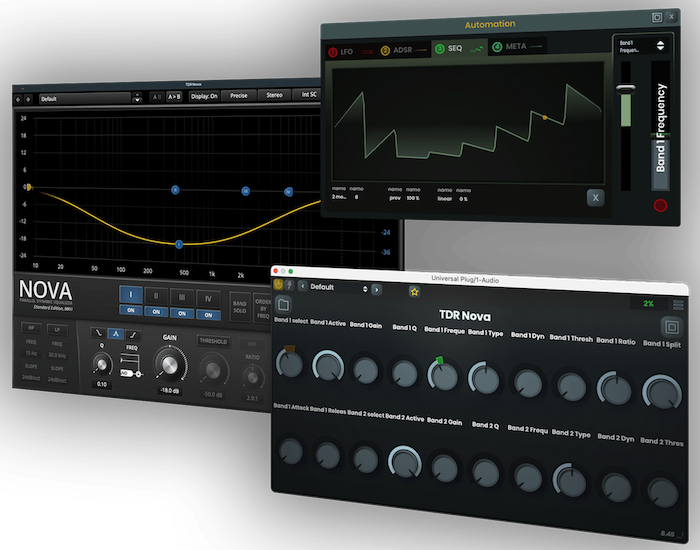
Note: the plugin on the left is TDR Nova, not Universal Plug itself.
This one is a problem solver. The problem being that not all DAWs support all the formats of plugin that are around. First off the bat is ProTools, which did their own thing years ago and can only use the AAX format, which not all plugin vendors support. Then we have Logic Pro, Garageband and Luna which can only load AU format, which means to use a VST you’d have to pop over to another host or DAW such as Cubase, Live or Studio which supports it. A major creativity and timekiller. So with Universal Plug this allows loading any VST, VST3 or AU plugin into any host. I don’t own it but from the promo shot it appears to expose the hosted plugin’s parameters that can be viewed as knobs like Logic doesn’t quite do so well and then you can automate them with its own LFO, step sequencer etc and I assume with your DAW’s automation too.
Time Off Audio dime [mb]
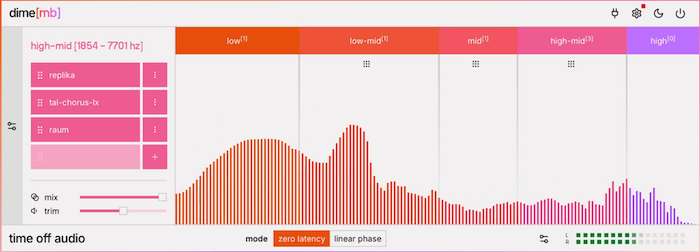
Although it’s a problem solver, this can also be used for creativity too. It combines the multiband aspect of Klevgrand’s Gaffel with Nugen’s SigMod (see below) so that you can apply an effect plugin to just one band of the incoming audio. So yeah you can do this in a DAW with sending a channel’s output to several buses to on which you have channels that have an EQ to do the filtering and then the plugin after it, then recombine them back into a new channel, but that can get complicated especially when trying to tweak things later.
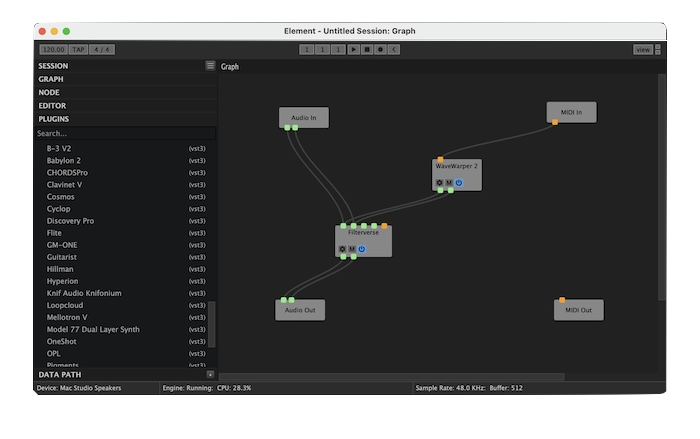
Element is aiming more at the DAWless musician, although it can be used from within a DAW too. The way they do this is by showing you a blank 2D space on which you can drag plugins and then use virtual wires to connect their inputs and outputs. It also supports MIDI along with audio. Good for the visual thinker so you can see a map of what is sending to what.
Note: when I last tested this, it couldn’t load a lot of my VST3 plugins and the AU plugins also failed validation and wouldn’t load. I hope this can be fixed in a future update.
DDMF Metaplugin
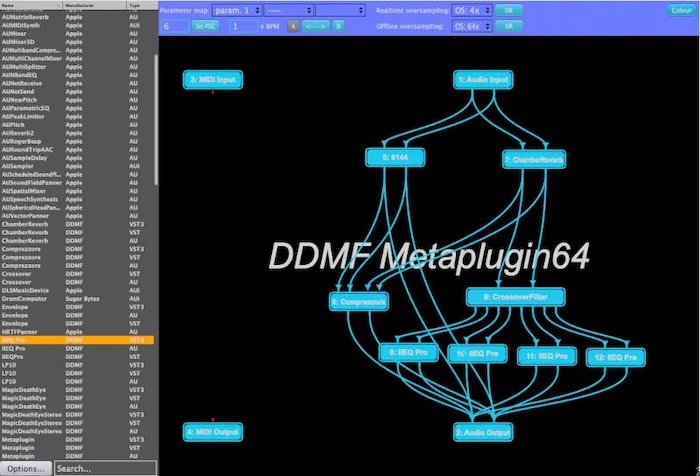
Like Element, this one uses a graphical interface and draggable wires to set up multiple plugins. It appears to have a longer feature list than Element, including eight channels for effects or sixteen buses for the instrument version, loading Intel architecture plugins into modern Apple Silicon chip hardware hosts, dry/wet control for each plugin, mid-side matrix, multiband splitter and cross track send/receive. So it can do what dime [mb] does as well as SigMod (see below). Plus there is a MIDI channel filter like the one in iOS host AUM has, in case your MIDI plugin floods all the channels with its output.
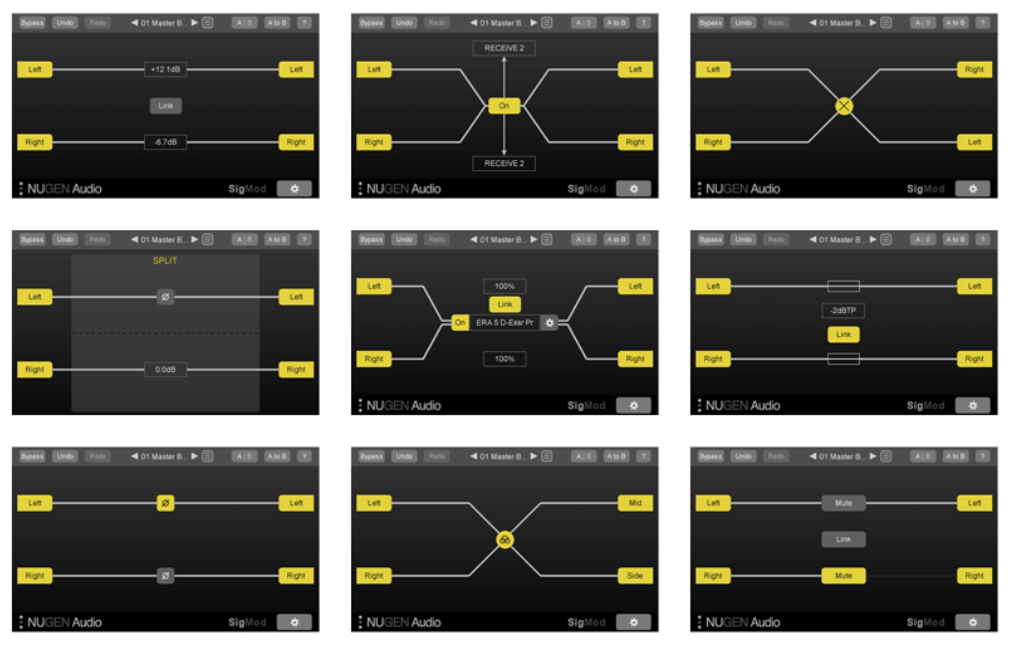
It’s not much to look at. Here are 9 of the 13 tools offered in SigMod, shown used individually. You can combine them into longer chains.
It sounds good on paper: send audio from one plug to a receiver on another channel, and do various things to it as it sends in real time. One of the features is that it can load another plugin in its internal chain, which means you can do things to the audio stream either before or after it hits the receiver. However I have a lot of plugins, and it fails to complete the scanning. That wouldn’t be so bad if it had a mechanism of tracking on which plugin it failed and offered to blacklist it like Cubase or even Final Cut Pro can. Instead it just crashes or freezes, which means I have never been able to use that feature. But that’s no big deal because I can’t really use it even without plugins, because it often just receives glitchy sounds in the receiver plugin or completely stops sending audio. This is as an AU plugin in Logic. I shall have to try again in other DAWs to make a final judgment.
BlueCat Patchwork
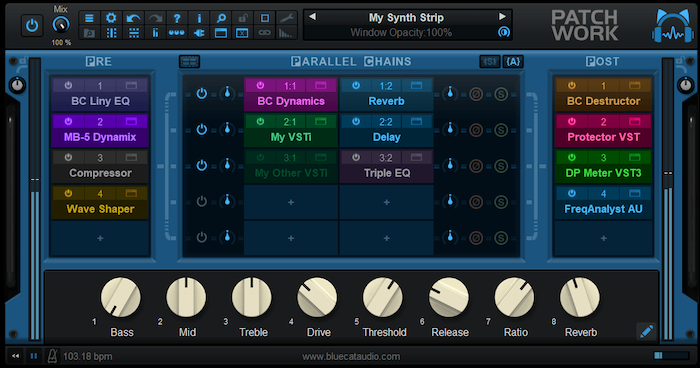
These folks have a number of plugins that can host others, the one that is most in this neighborhood of peers being PatchWork which claims to be able to host up to 64 plugins in either AU, VST or VST3 formats. These can be run in series or in up to eight parallel chains. Additionally, this includes 30 effects including Reverb, EQ, filters, pitch & frequency shifter, delays, modulation effects, compressor, and gate. There is a global dry/wet parameter and MIDI support. The next tool in their toolbox is Connector, which not only lets you send audio and MIDI to other channels within your DAW, but it can send and receive from instances installed on other computers in your network. I would recommend using an Ethernet cable to connect your computers to reduce latency, and perhaps even temporarily switching off WiFi to ensure the computers have no choice to use the WiFi. You might not need this in Windows, I’m not sure, but in macOS you don’t have control over what apps have access to what network hardware.
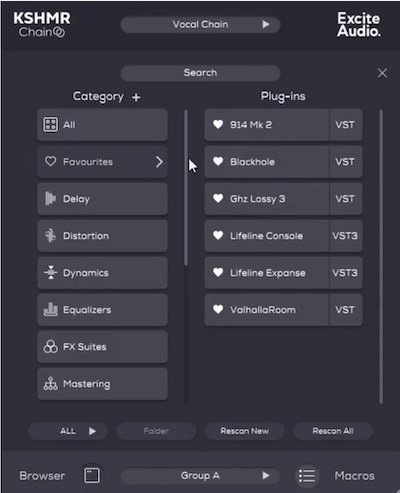
A problem solver. So if you have a bunch of plugins you usually set up in sequence — a chain — your favorite DAW can usually save that as a Channel Strip which you can then use to create new channels. But what if you want to make changes to all occurrences of your EQ or reverb within that chain? Let’s take Logic as an example: you can open the plugin window, then make changes to a parameter. Normally you’d open multiple copies of the plugin and change the value on each one, either turning the knob or typing in a field. You find out that Logic can load the other instances of that plugin in the same window with one of the UI settings, but you still have to click on each channel and make the change.
With this plugin you set up one Leader plugin and several Followers, and changes you make in the Leader are of course followed in the Follower instances. Plus you can add your favorite plugins into categories, save chains and control multiple parameters with ten macro slots.
White Elephant Audio Syndicate
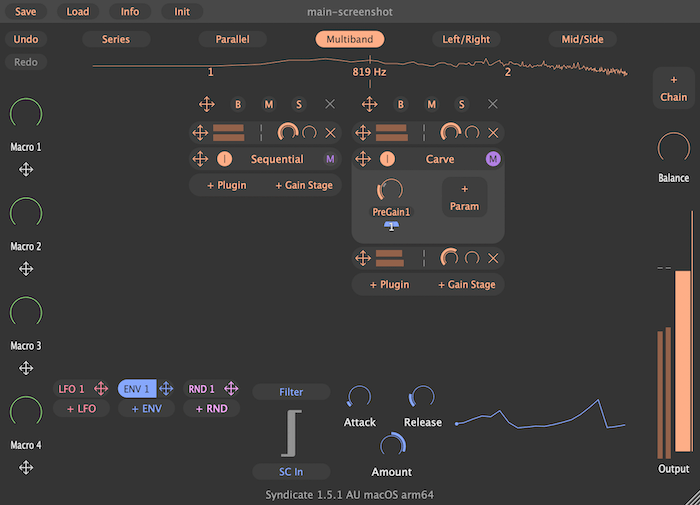
The white elephant has chosen to let the video do the talking, showing no feature text on their site. What you can do here is load plugins into this host, then drag and drop LFOs to their parameters, thus virtually twisting the knobs for you automatically. Of course you can change aspects of the LFO such as the rate and shape. So it’s much easier to set up than using a separate MIDI LFO plugin within a DAW like Logic and having plugins listen via the Smart Controls. It may be easier in other DAWs like Fender Studio Pro or Bitwig.
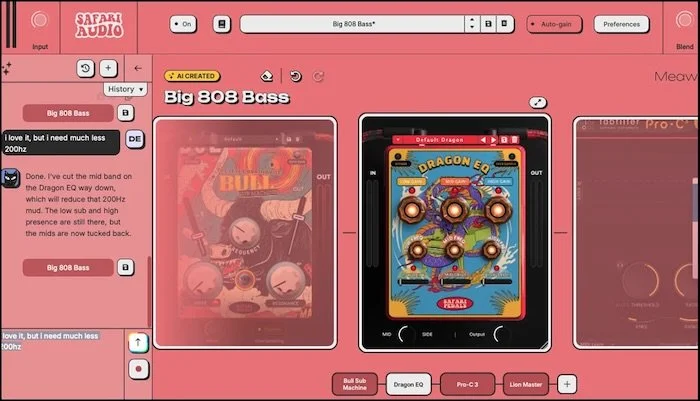
Yes it’s another host, but its claim to fame is that it uses an integrated AI-based tool which knows about all the Safaripedals plugins, stock plugins in your DAW and a number of 3rd party plugins — currently listed as hundreds however they claim to be increasing that — which you then write prompts to and it makes plugin chains for you. I have not yet watched the promo video but I don’t believe it can turn the knobs of the plugins or choose the presets.
How could I forget:
New Sonic Arts Freestyle
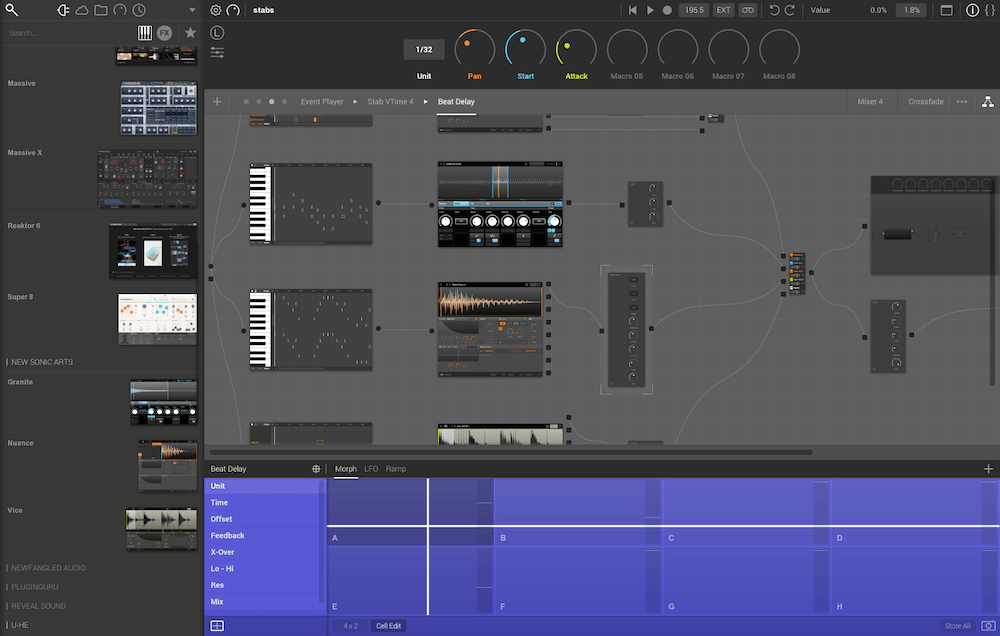
Straight from the top of your dome
I’ve had this one for a while and I had forgotten about it! It doesn’t get a lot of attention. Like Element, Metaplugin and Syndicate, this one lets you load and connect your plugins in a nodal interface. It can be used as a live performance tool or for DAWless recordings as it has a standalone app.
Honorable Mentions
Although a plugin-within-a-plugin is undoubtedly useful for certain scenarios, sometimes you just need a host for using a plugin in a standalone scenario. I thought it would be useful to have these in the same post in case you are a DAWless musician or audio worker.
Rogue Amoeba Audio Hijack
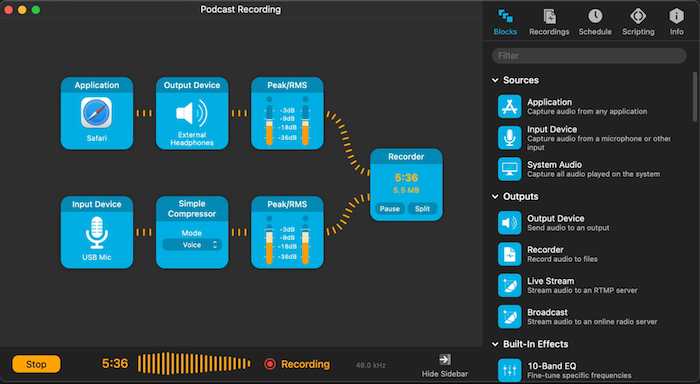
MacOS only. I don’t think this was designed for musicians, but there is no reason you can’t use it for that. At least for the audio part, as it does not support MIDI data. For that you would be using the old IAC virtual MIDI bus where the host sends the MIDI there and another plugin (or hardware) listens to that bus. Although out of the scope of this article, you must activate the IAC port using the Audio MIDI Setup app that comes with macOS. As you can see from the screenshot, this also uses a graphical interface to drag and drop the AU format plugins into a chain. For Windows users, check out DDMF Virtual AudioStream.
Digital Brain Instruments Transformer
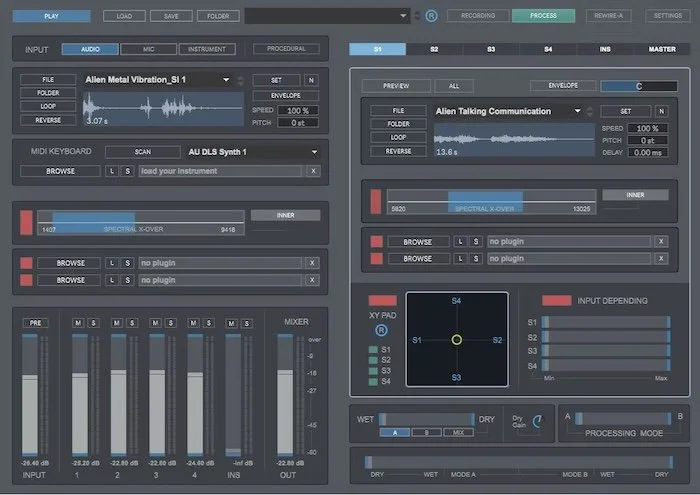
Although it’s not a plugin itself, this standalone app can host plugins to process the audio within the app itself. I thought it might be interesting for people wanting to make their own samples or use it live in a DAWless setup.
So there you have it, a number of plugins that can themselves host other plugins. If you know of any others that I’ve missed, I have turned comments on so you can let me know, or tag me on social media sites. Or just tell me if you use any of these and how they help you make music or sound effects.
To see all the cool music and audio software I discover in my travels, hop over to the Tool Much Fun blog, which is also now available in podcast format.