
This edition offers:
Music • Samples • Kontakt • Mac • iOS • Graphics • Video • Development • AI • Social Media • File sharing and Media Consumption.
The podcast version of this is out now, so if you prefer to have this read to you while you do other stuff, you can do that.
Is it just me, or is there just a boatload of stuff around? I’m finding it hard to keep up. And not just new products from existing vendors, it’s entirely new ones I’ve never heard of before. It is likely that AI is at least partially involved with these, due to the recent advancements in coding ability. I didn’t use the word “skill” as I assume people will want to save that for humans. In any case this means that there are a lot more products in probably every category, because things can be shipped more quickly or people who had a tricky problem coding something can get help faster than looking up examples and discussions on StackExchange. So here’s me doing my best to pick out the things that look interesting, useful, tempting or amusing. These aren’t full reviews, just my thoughts on what the product is and if it might help us make new things or enjoy existing things.
Music
SonicZest Chord Sketchpad
A web app for arranging chord loops. You can test them in the browser and then export MIDI for use in your DAW or music apps. They also have a drum machine version. It’s free.
Reverie
This is an ambient soundscape generator for Mac & Windows. It employs 37 effects you can reorder and save as a preset.
Meyer Devices Tessella
A physical pattern generator for Ableton full/MaxForLive. It reminds me of an iOS app Fugue Machine Rubato but has its own features and flavor.
Osterhouse Sounds Note Walker
At last a novel idea for live MIDI playing! This first plugin by Ben Osterhouse changes how you play notes. The first note is the anchor then the next keys you play go up or down the scale you choose with your left hand (in a zoned area). You have to watch the video to grasp the concept. A time limited trial is available.
Calloga Unshuffle
This is a sample manager, however it appears to be one that is for sorting your library into new folders rather than leaving them where they are and just indexing them.
Buchert Audio
A range of plugins from a developer I hadn’t heard of before. They offer Tonality EQ, Warmth Engine, Mess Engine, Depth Engine, and Double Wide which is their freebie.
Cinematic Alpha Aristotle
A “creative reverb” which means that you have access to manipulate a number of parameters (Reverb, Delay, Filter, Gate and Shimmer) to get dynamic effects.
FX Mechanics
These folks make a few freebies that look interesting, such as MechanOdd, a physical modelling synth and TeAr, a MIDI arpeggiator that supports four independent lanes for polyrhythms.
UB DSP Vowel Blender
You know that sound when an instrument has a human voice aspect? That’s called a formant and this effect plugin lets you add that to your sound. There are a ton of modulation options to get dynamic changes.
ROBOTROMIX
Maker of Max4Live devices Sc0pe, K1x and Snoo2e, which are a stereo wave monitor, pitch-drive kick generator and “sleepy time-warper” respectively. A reminder that you need to shell out for the full version of Abelton Live to use these.
Beatcanvas
Drum Machine • for Mac. Yeah it’s cheaper than others you might see, but that appears to be because this is a standalone product: it doesn’t mention MIDI out, or even being able to export your beat as an AIFF or WAV file. So you’d have to capture the audio using AudioHijack or a similar product.
Sound Trek Voyager
Audio Utility • For audiophiles, Apple does not give you enough information about your audio devices. This developer has made an app that can report the resolution of each of your audio devices, however it will require an audio routing app such as Loopback to work properly.
Psytrance Plugins Nasty Looper XDream Live
A plugin for live loop work. Each of the 16 Pads can have 4 files in it which can be either one shots or loops. There is also a synth and there appears to be some kind of arpeggiator. It doesn’t seem like it can send MIDI out to other plugins though. Includes a 2GB sound bank.
Dexibell T2L Piano
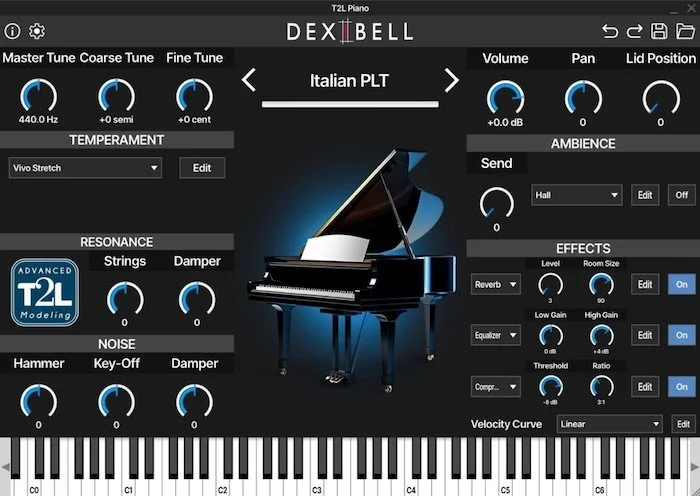
Virtual Instrument • The complexity of the sound of a piano is difficult to capture, and if you’ve outgrown the flabby-sounding samples of a stock piano or SoundFont version and have been lusting after the quality offered by a Kontakt version, but don’t wish to invest in Kontakt, have a look at something like this. It’s a normal plugin that combines samples with modeling to attain more realistic piano sounds. There are eight pianos offered, 38 presets, totalling 5GB of storage. There is also a reverb, flanger, chorus, phaser, EQ, compressor and more.
Wavesfactory Re-Esser
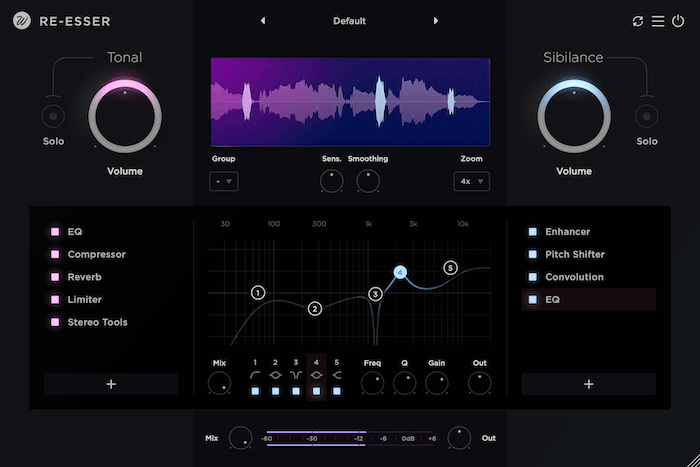
Don’t just de-ess. RE-ess!
Vocal effect • Wavesfactory want to take you “beyond the de-esser” with their offering, which is really more of a vocal suite. In addition to powerful de-essing it boasts a chorus, compressor, convolution reverb, delay, enhancer, EQ, flanger, limiter, lo-fi, phaser, pitch shifter, saturator, widener, tremolo and vibrato. I already bought Pulsar Vocal Studio which does a few of these jobs, but if I hadn’t I would probably get this one.
Midiremap
MIDI Utility • This is a tool for remapping MIDI drums, for example going from GetGoodDrums to Toontrack, Addictive, Bogren, MINDst, Ugritone and others. You can try out a few conversions for free, buy single -use credits or pay for a subscription which then allows you to download their plugin for your DAW.
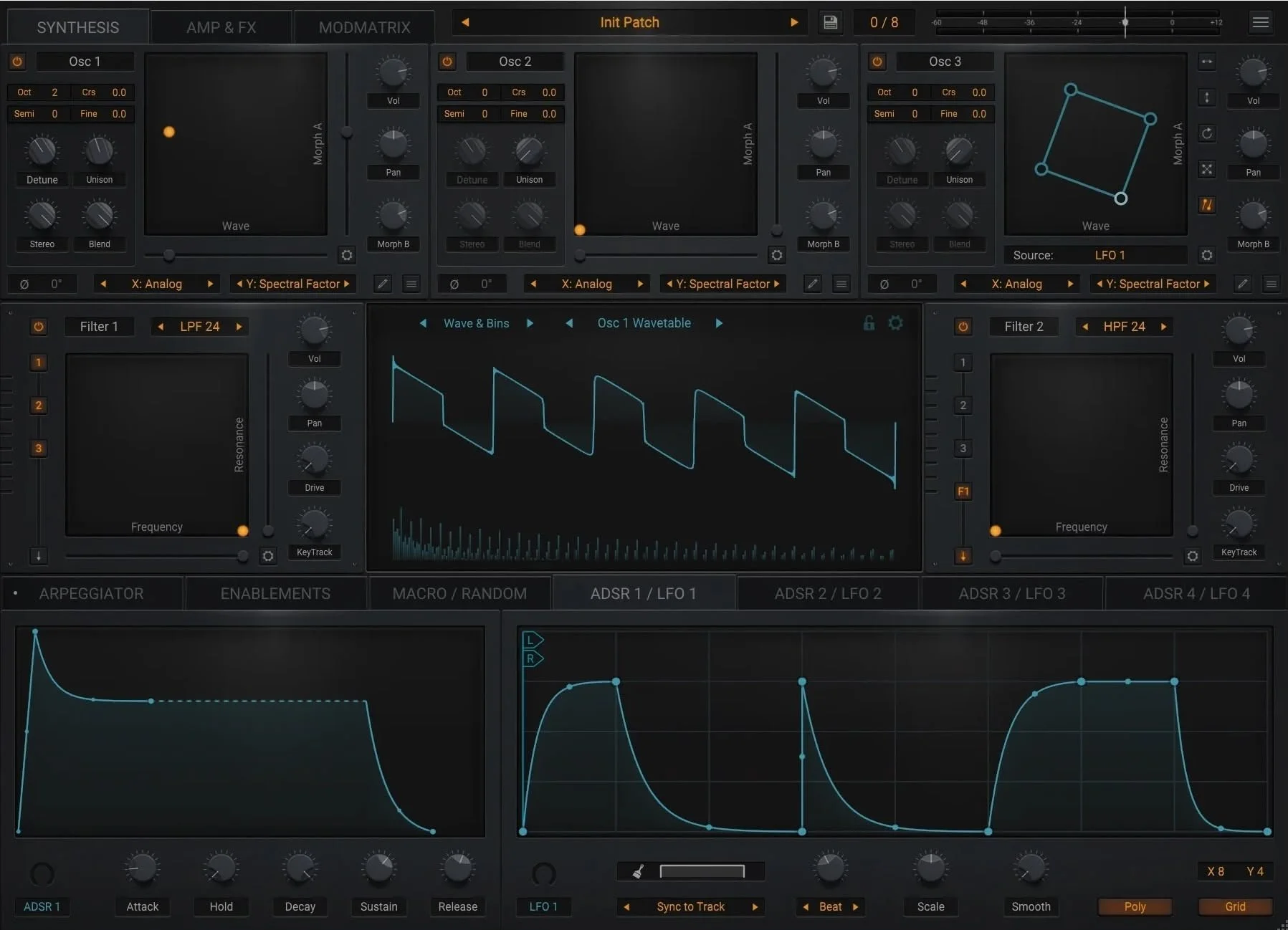
The Wave Warden Spline Wavetable Synthesizer
Spline has three wavetable oscillators for making otherworldly sounds, and the reason it’s titled Spline is because you can draw splines to make paths that the LFOs will follow. Plus it includes lots of onboard effects like Phaser, Chorus, Delay, Flanger, EQ, Compression and Reverb, which can be controlled by the LFOs of course.
BANDBOSS
Band Organizer • So I have to sneak in a few tools that are about managing the music admin side of things rather than just the music creation, but there’s currently not enough products I find for music admin. For those of you who play in a band, you’ll know there’s lots of stuff to be organised. Services like this allow you to arrange rehearsals, gigs and contacts. It doesn’t seem to have a setlist feature like Bandhelper, or a way to display lyrics or send MIDI like Bandhelper can. But it integrates with your social media services and can also help with a press kit for promotion.
Samples
Isaac Haines SoundFX Pack Vol 1
A pack that’s over 300MB that includes 164 sounds, split into 70 risers, 40 impacts, 30 swooshs and 24 experimental sounds. Mr Haines also does a cinematic and hip hop pack you can check out.
Loud Foundry Cyberpunk Midtempo Bundle
This one’s got over 2,800 files, comprising cover over 600 Bass & Synth one shots, 500 Drum one shots, 450 drum loops, 300 Bass & Synth loops, 400 FX loops & one shots, 300 MIDI Files and 70 presets for —you guessed it— Serum.
Mixkit Free Sound Effects
Mixkit offers these sound effects for free, and can be used in commercial projects. If they don’t have what you need, you need to subscribe to their owner site Envato.
Freesound
Yes, over 700,000 free sounds, and some can be used in things you sell like music pieces or movies — some of the licenses are Creative Commons with attribution, so you’ll have to include that info in your credits.
ccMixter
This site aims to get musicians to upload samples and singers to upload a cappella samples so producers can use these in their songs. As this site is still in beta, the commercial licensing information is not yet available.
USCB Cylinders Archive
Old school! Before LPs, recordings were made on cylinders. If you want some ancient, possibly creepy recordings, check this out. Anything older than 31 December, 1922 is now in the public domain.
Planet Fire Samples Sweat
A pack of 45 Bass Loops, 16 Bass Shots, 20 Arp Loops, 20 Pad Loops, 164 Drum Loops, 77 Drum Shots, 34 FX, 14 Lead Shots, 30 Melodic Loops, 14 Song Starters, 15 Stab Loops, 35 Stabs, 35 Vox, 20 Chord MIDI files plus of course, Serum presets.
Ushi Samples Ushi Summer Bundle
Over 800MB of samples: 120 Drone Loops, 60 Synth Textures, 100 Synth Shots, 75 Kicks, 50 Snares, 25 Claps, 75 Hats, 75 Percs, 65 Risers, 35 Impacts and 10 Downlifters in 44.1 kHz, 16bit format.
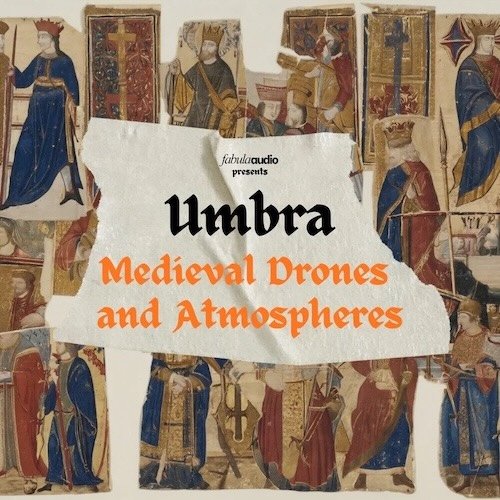
Fabula Audio Umbra Medieval Drones & Atmospheres
12 royalty free songs totalling 51 minutes of music which you get the stems for so you can use them in your work.
Kontakt Instruments
Ocean Swift Synthesis Myth Rhythm
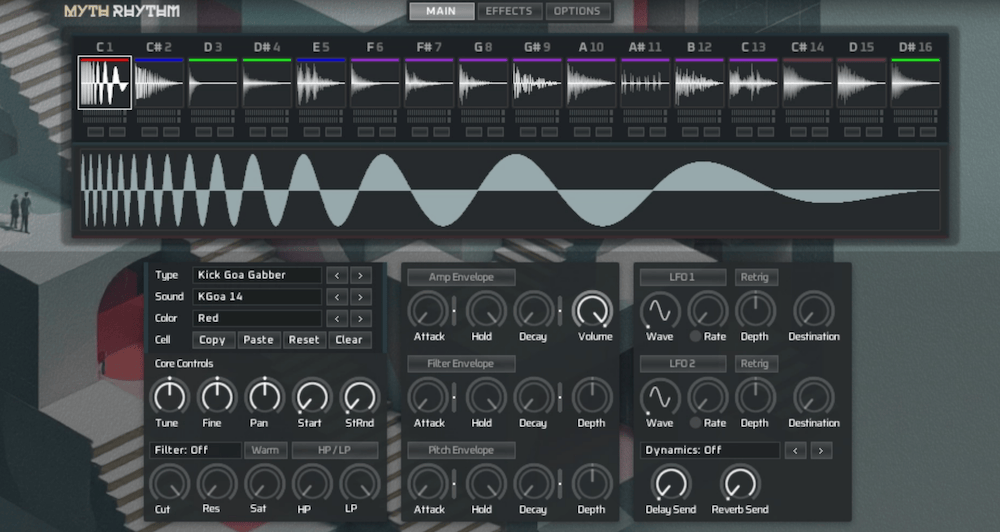
The Ocean Swift folks call it “The Ultimate Creative Playground for Drum and FX Sound Design” It includes over 4,800 samples (and they get extra points for not typing it as “4800+” like the young folks like to do). You load these into 16 cells and then you can play with them using filters, envelopers, LFOs, pitch shifting, dynamics and modulation control per cell.
e-instruments Desolate Guitars Fragment
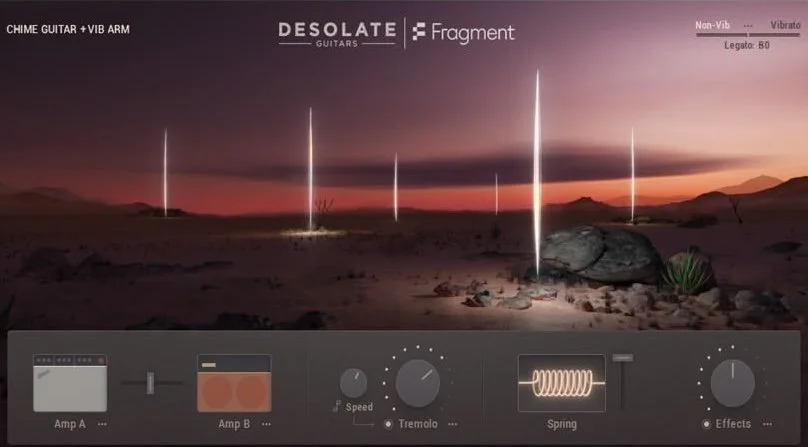
Don’t worry, those glowing energy beams are friendly
A “fragment” freebie of the full Desolate Guitars product. They used a “60s guitar” recorded through two different amps and microphones through a Neve mixing desk. Plus spring reverb, tremolo and vibrato effects.
Redpack Drums Bronze Kit
Are your drum samples not realistic enough? This product offers 15GB of samples from a “solid bell bronze” drum kit valued at $30,000. There are up to 10 velocity layers to get this realism. For rock or other heavy music.
Mac
Superwhisper
Need more from your dictation software? This one does use AI but it works offline. It lets you add custom entries and supports over 100 languages, and can translate them into English.
HoldSpeak
This one stays in your menu bar to keep out of your way. Free download from Github. Compare with Wispr Flow which I posted in Tool Much Fun 23.
Slashit
Slashit’s name may be from them declaring their tool will help you slash the time taken to write things. Some people have more trouble writing than you might be aware of, so this purports to help them. This offers rewriting text like the ChatGPT function within Apple Intelligence, but also includes text expansion and a clipboard history tool, so I am including it here in the Mac section rather than in the AI or writing section (where writers wouldn’t use it anyway). It’s free for personal use, and the first tier is US$5 a month which allows unlimited text snippets and you can hook up a paid AI service using an API key. Next, check out
TypoTab
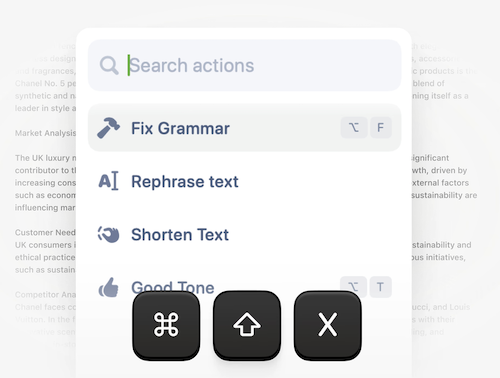
Make fewer typos with TypoTab
Another offering that wishes to turn you away from Grammarly or other writing improvers. Once again it uses AI-based software and for this they want £6 a month for unlimited use with an annual discount as you’d expect. Like Holdspeak there is a MenuExtra and like Slashit there is a keyboard shortcut to invoke it. They claim it works in all apps (that accept text input of course).
BoltAI
Yes it could have been in the AI section as that’s what it’s about, but it’s a Mac-only app so it’s here instead. Their claim to fame is that it works better than Apple Intelligence by being bound to a keyboard shortcut, and once invoked you can use “OpenAI, Anthropic, Google, Mistral, Azure, Bedrock, and local models in one unified workspace” the former of which would obviously need API keys.
Ryplix Studio’s AppGrowKit Free Tools
Bit of a long title, but Ryplix Studio’s page includes some free tools for indie iOS developers including a keyword rank checker and top app store charts, plus graphic tools like one to resize your screenshots of your app to those acceptable by the App Store.
Ping Warden
Networking • I don’t prefer to copy and paste the pre-written descriptions, but this one says it all: “Ping Warden is a free, open source macOS menu bar app for latency-sensitive games, calls, and cloud streaming. It watches Apple Wireless Direct Link (AWDL), the network interface used by AirDrop, AirPlay, Handoff, and other nearby-device features, and keeps that interface down while Ping Protection is active.” So check it out if you want to squeeze more bandwidth out of your Mac.
Dropcopy
Utility — File Transfer • We always need to move files from one device to another. But it can be a pain to have to copy files onto a server, then connect to that server from the other machine, or even just turn on File Sharing and connect to the one the file is on. This app for Mac, iPhone and iPad aims to make all that easier. I can tell you’re thinking that you’d just use AirDrop, but this app lets you send to multiple destinations in one hit. It appears to be free.
DimCyan’s iOS Remote
iPhone Mirroring is great, but you may have some issues with it. iOS Remote is for controlling an iOS device from within a browser from Mac, Linux or Windows. It does not require jailbreaking to get it to work. However it does not appear to have been updated in 5 years, so it may only work on your older devices.
SHRTCTS
It’s a website for learning the keyboard shortcuts for a number of packages, such as Figma, Framer, Affinity, InDesign, Photoshop, After Effects, Cursor, Notion, Slack and others. It’s pretty cool; hover over a command and the keys for the shortcut are highlighted on an onscreen keyboard. There is another product with the same name, but it isn’t out for iOS yet so it will eventually appear in another issue.
Swift Salamander
File Manager • A dual-pane file manager with features designed for developers who have many files and folders to work with between a source and destination, one of which is usually online.
DiskCleaner
Utility • Somehow humans have built these wonderful devices but we have made them in a way that their storage keeps filling up making them less performant. DiskCleaner is one of several apps to help you analyze and battle the buildup of unwanted files. You can also use it as an app uninstaller; you drag and drop an app onto it and it will show you all the cruft files that it left behind.
OpenLid
Utility • For people who primarily work on MacBooks, they are often telling a server to do something. But when you close the lid everything goes to sleep and your connection breaks. OpenLid is designed to keep the connection open and so whatever you’re doing keeps working, for examine an SSH session, Cursor, Claude Code, or Codex session and it keeps your Mac awake automatically — for as long as they're working.
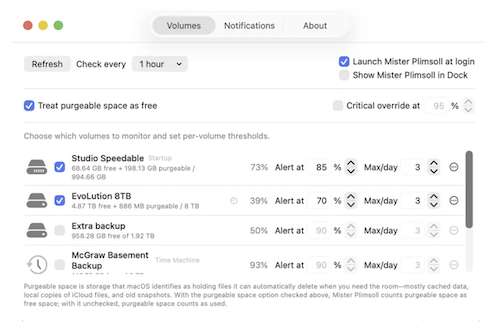
Let Mr. Plimsoll keep an eye on your free space
Mister Plimsoll
Utility • Glenn Fleishman has made a utility for monitoring the free space on your volumes so it can alert you if they’re getting low. Donationware.
Gostonx’s uninstally
Utility • A clean, native macOS uninstaller. Completely removes apps and every file they leave behind using smart bundle-identifier detection. It includes a Finder extension.
CCCCorners
User Interface • A productivity menu bar app. This one lets you open or close apps by dragging your cursor into a Hot Corner.
iOS
Defter Notes
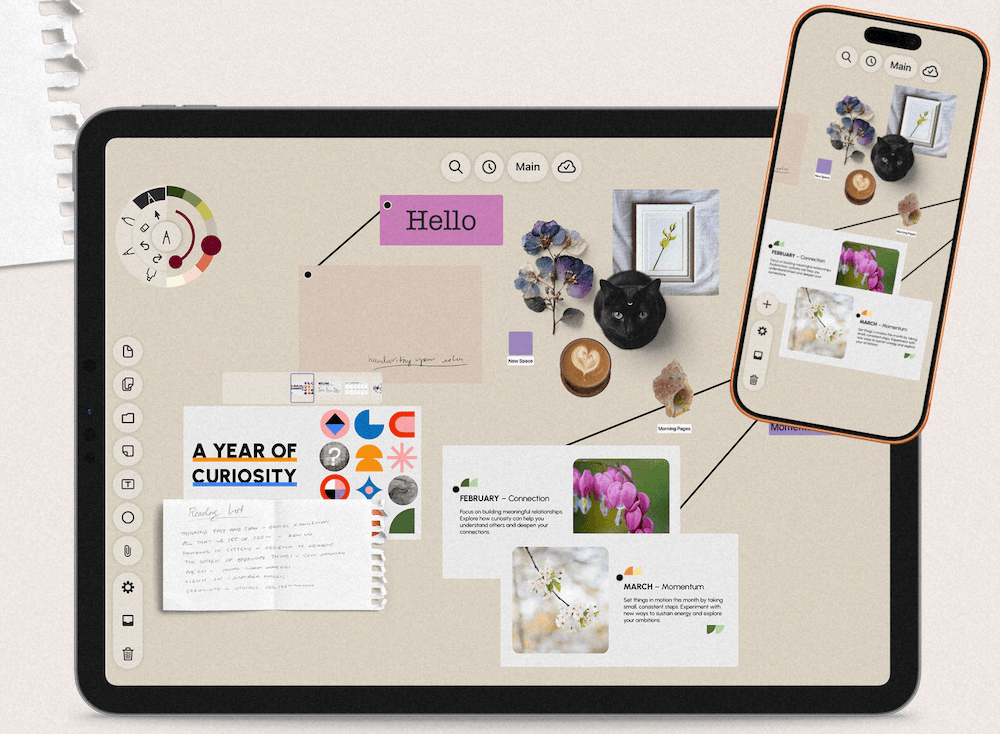
Make your notes defter with Defternote
This is an infinite canvas note taking app for iPad, probably best paired with an Apple Pencil or other stylus. It claims to work the way your brain does, so you can just keep zooming in and writing notes or drawing scribbles. You can add in images, files such as PDFs and others. It’s subscription based of course but there is a lifetime license offered.
Clink Custom Keyboard
Most keyboard apps are all about the look, letting you change colors and backgrounds. This one includes that but also boasts some key customization such as adding a number row, split keyboard, swipe to type, clipboard history, notepad and it’s own autocorrect system. Plus, single purchase — no subscription!
Fontfy
Another one for modifying the look of your keyboard, and it also includes a clipboard manager and a symbols keyboard that shows hundreds of other glyphs from the Unicode set. I use a separate Unicode keyboard and yes, switching back and forth between them can slow you down and is annoying, so this might be handy. You can also translate your text into “dozens” of languages, but it does not say which AI software it uses for this. There are subscription options or a full unlock purchase of $60.
Ta-da
YATA: Yet Another TodoList App. There are so many. But will this one have the right look and feel for you? This one hopes to help you get on top of your tasks by showing you how full your day is, and supports voice notes and the Apple Pencil.
Here’s a few more apps to save stuff you find on the internet so you can categorize it and look at it later.
Linkwise
If only I’d found things like this a few years ago: you wander the web and find all sorts of things to revisit later, but how do you find them again? This one boasts an article reader to remove ads etc, sort things with tags and collections, plus do AI queries of your saved stuff, and it can read articles to you. $100 a year is asked to use all the AI features. Also check out:
Quark
No, nothing to do with the bartender on DS9 or the once-ubiquitous page layout software, it’s also a collect-everything-for-later app. This one works on Mac, iPad or iPhone and lets you save up to 50 items for free, or pay $40 for the full, Pro version. Warning: requires OS 26.2 or later.
Hordr
The last in this issue’s save-anything apps. But this one’s free, so it just does the basic capturing and filing, however it offers sharing of your collections with other people — I assume they need to install the app too but it doesn’t say.
Extra
Like rain, email never stops, and sorting it is a hassle. This app says it will help with that task, as well as dictation. Currently invitation only — I wonder how it got on the App Store with that being the case.
iOS Graphics
ClearPastAI
A photo editing app specifically designed to restore old damaged photos and colorize them. If you find those faded colors and scratches distracting, and don’t mind that it is less “real” than the original photo —like one edited in Photoshop would be— this might be for you.
HeyDazz
A new one in a long line of film-look camera apps. This is one that shows you the filter live in the preview as you take the shot. Six looks are provided free, then subscribe to the Pro version for an ongoing supply of new filters.
iOS Music
AirPianoPro
This app uses the camera to allow you to play an instrument in the air with your gestures. It currently can’t send MIDI out so you can play your other apps — it uses an onboard SoundFont.
AU Studio
I wasn’t sure if I should have this in the Development section as it does seem useful for AU plugin developers, however that area is not specific to iOS. This tool analyzes all your AUv3 plugins and has functions for testing them. So if you are having an issue with one of your plugins, if your developer hasn’t heard of this you could test it in this app and share the results with them to assist in troubleshooting. It is not intended to be used for making music.
Riffpad
I should get this, because often I am writing a song and I just need some simple melody repeated, or some effects plugins can listen to Note data instead of CCs to select different parameters, for example changing a value from 1/4 to 1/8 beats.
Tone Editor
This is a synth plugin. It appears the developer isn’t interested in trying to emulate the appearance of hardware synths and has eschewed rotary knobs, opting to go for low-resource-using native iOS UI elements. Then you can play the synth in their companion app TinyRiff.
Naive tracker
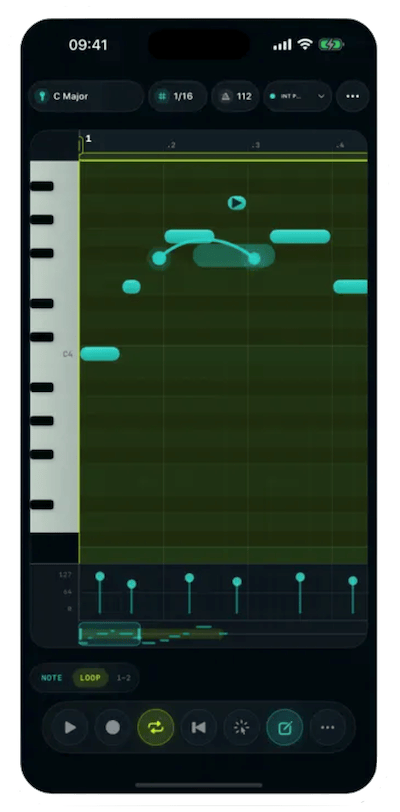
Go retro! Back in the old days, electronic music was made with trackers, which if you hadn’t heard of was an interface that looks like a table or array. The table’s elements include the note pitch or other data. It looks quite different from a side-scrolling MIDI note interface you might be used to.
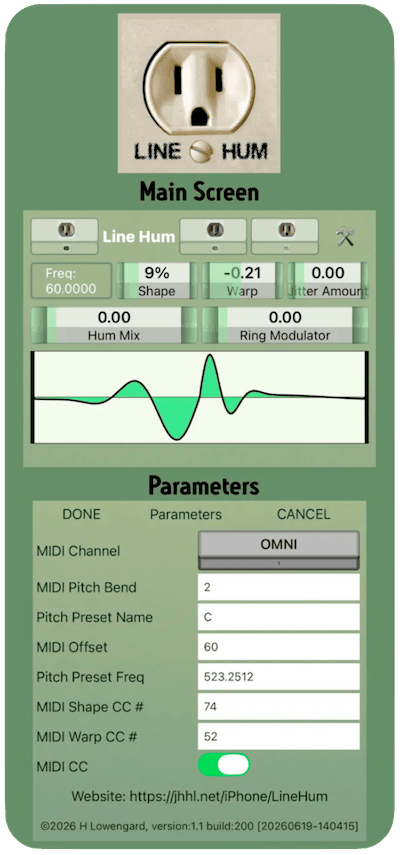
Line Hum
Mostly we want to get rid of line hum, but some people have used it in drone music. This app is all about making different kinds of hums which you can then send into other effects apps to make your music.
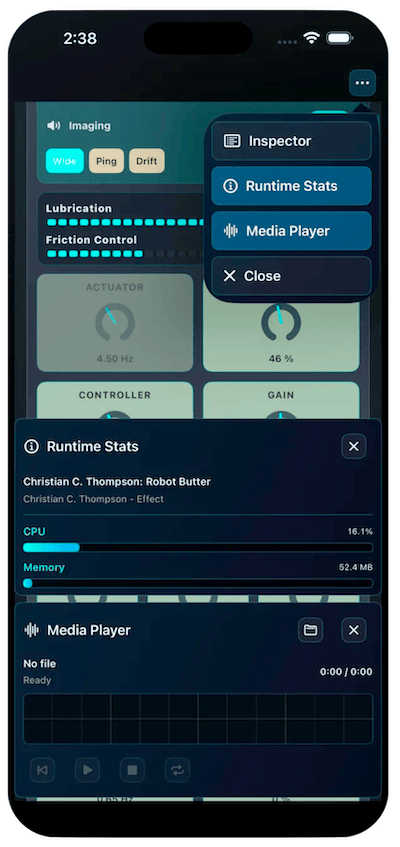
Robot Butter
A pleasant-to-look-at effect plugin in which you can use LFOs to control modulation parameters and adaptive reverb to get pulsing, washing, widening and other dynamic effects.
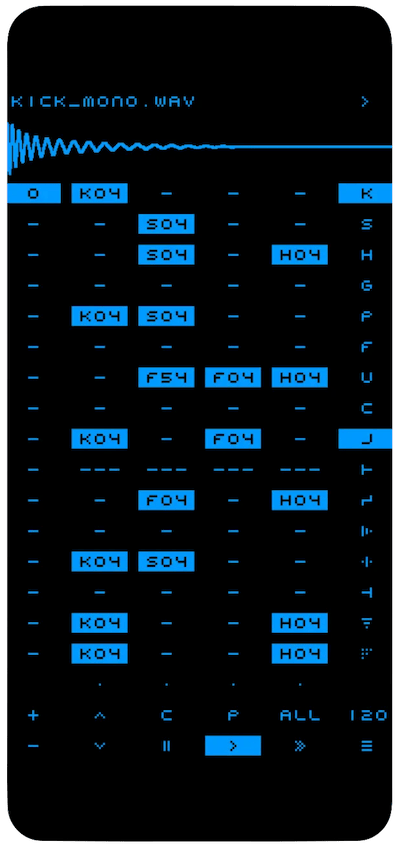
Are you naïve about trackers?
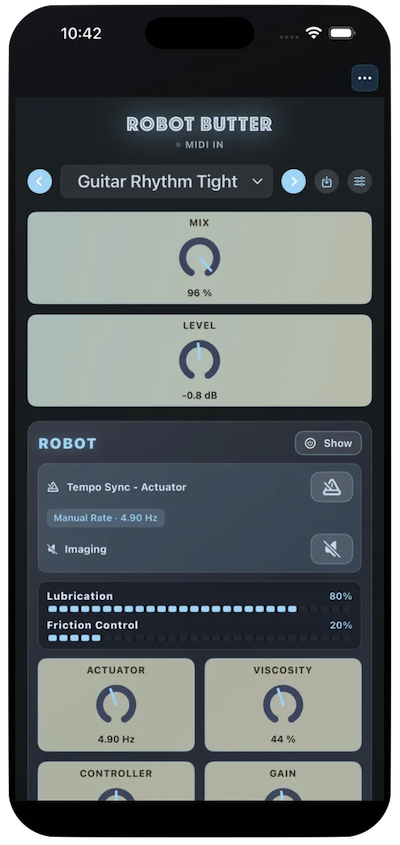
Apply some robot butter to your track
SwarmaDie 2
A synth that uses eight oscillators with different frequencies that you can activate independently and then use two strips to control the pitch of the second one so you can make drone sounds. Also available for Mac as a separate purchase.
MIDI Morf
Another member of a family of apps to turn the iPad into a MIDI controller. This one offers 7 controller layouts, but the thing that turns me off of it is that it needs a server app installed rather than being able to use Bluetooth or WiFI MIDI, and I already have tons of server apps running.
Graphics
Slideegg
Over 100,000 free presentation templates which they say will work in PowerPoint, Google Slides or Canva.
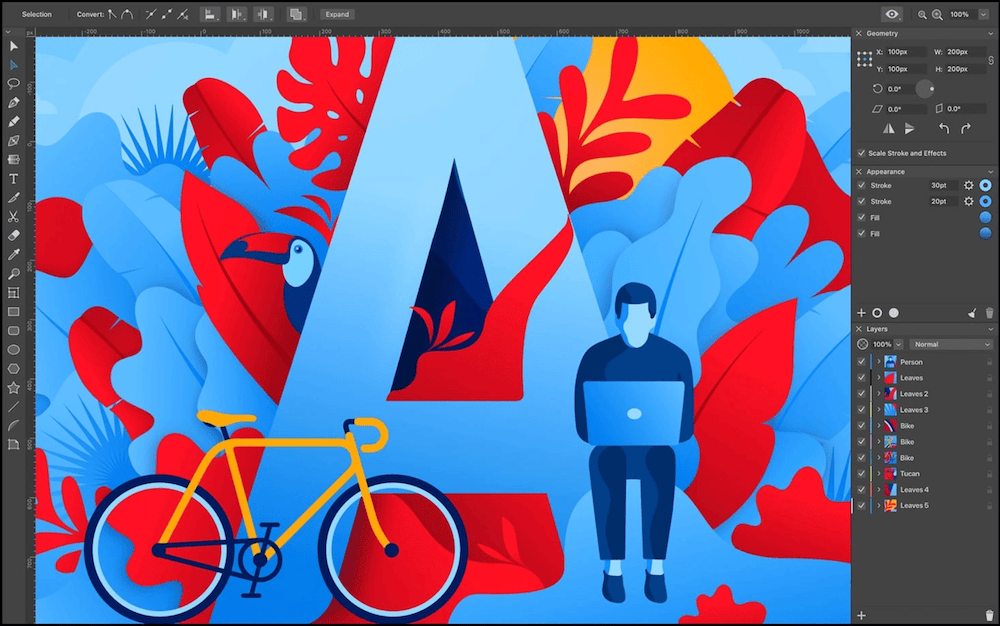
Amadine
Vector graphic design software for Mac, iPad and iPhone. There have been alternatives to Illustrator, the elder of vector design software, for years. This is another of those to check out. There is a lifetime license available — no subscription — but remember this does not mean updates for life. At some stage there will be a new version that you’ll have to buy. Anyway this one can export in SVG or PDF for vectors, or TIFF, PNG and JPEG for convenience. Check out the Fusion Tool for making complex shapes from overlapping primitives.
Brik
Technically this is an AI-based system, but I felt it belongs here in the normal Graphics section because you use the AI to help build you a customized design tool, with your attributes you can later use your human fingers to type values in boxes, or to drag sliders to modify. Kind of like a mini Figma, Motion or AfterEffects for doing one effect or animated element. There are some examples on the site for you to try.
Text Art Tools
Well, looks like the graphics section of this blog may be almost unnecessary for the next little while, as this person has already found dozens of sites and apps to be checked out. It’s simultaneously inspiring and disappointing to find lists like this, because the thoughts are do you check against this list each time you find something and only list things that aren’t there? Or do I use this as a jumping off point, check a little more thoroughly and add my opinion about them in my listing? For example I tend to note if the site can actually export a file or if you’ll need to screenshot it, save a work in progress if you make an account and if there are any payments or subscriptions. Plus I do some screenshots.
Wflixu’s iMonet
An image viewer for Mac. When you zoom in, it follows your cursor so you don’t get lost in the image.
GraphiteEditor
Community-built comprehensive 2D content creation application for graphic design, digital art, and interactive real-time motion graphics powered by a node-based procedural graphics engine.
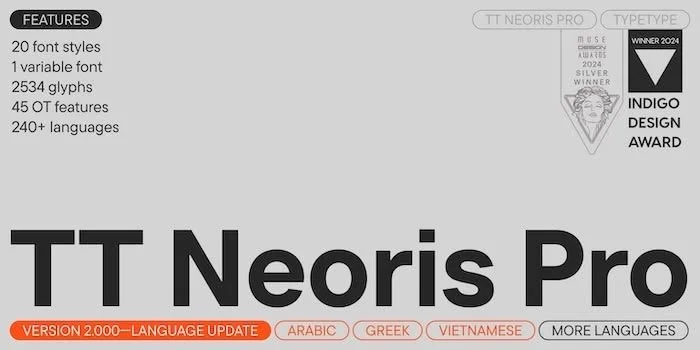
Hey what happened to the Fonts section? Check out TypeType’s range if you need some new ones.
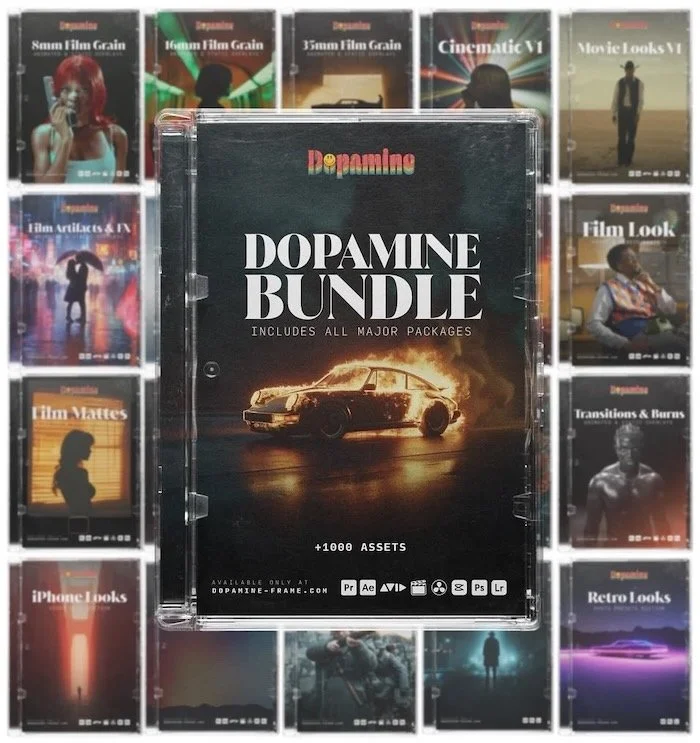
Over 1000 video effects assets including Transitions, Burns Overlays, Film Artifacts, Film Grains, Film Looks, Film Mattes, Sound Effects, LUTs and Presets which seems to be combinations of the above.
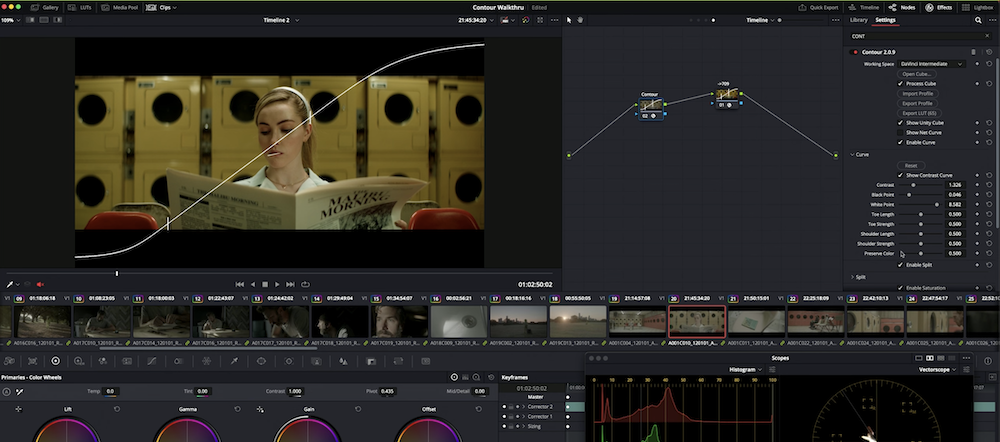
Cullen Kelly Color Contour
If you’re serious about color grading, you need a serious tool. This gives you a huge amount of control over your color. I will point out that some of the before-after examples are quite subtle because they are only affecting the tone of one object in the frame, but others are more noticeable especially because they don’t mess up the skin tone of the human subject while they change the rest of the frame.
Alphalabs defeedbackAI
This appears to be a plugin for removing feedback, reverb and noise from your audio. They also make a Transient Magnifier. There is very little information on the site except for a Youtube video for each one and that they are available for both Mac and Windows.
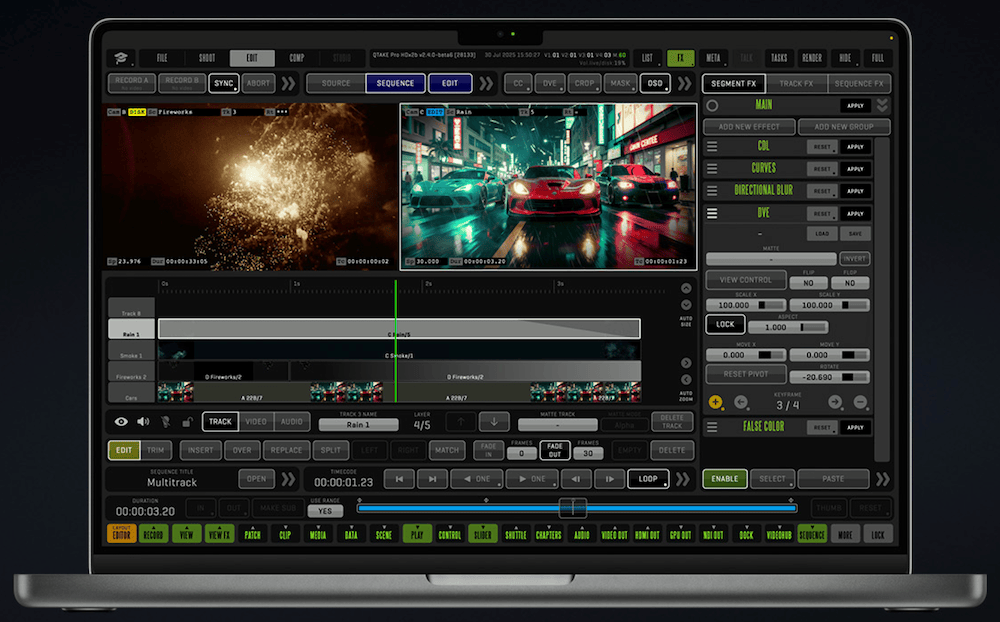
Pro interface for pros
In2Core QTAKE
Their claim is that it’s the “most advanced software tool for video assist professionals”. Another peek into the world of professional movie making. This one can log, capture, playback, edit and process video output of any camera. It seems to need special video hardware to use it, it’s not clear if it will work without it. At least I can tell you that these folks offer a cloud service so that remote workers can access the shoot quickly, and an iPad app for people on-set to see it too. Plus you can import your script and read it alongside the clips.
Development
Vercel
“Build and deploy the best web experiences with the AI Cloud” is their tagline. Yes, I know, if you are in Development you have probably already heard of Vercel. I’ve seen the domain name pop up a few times here and there. If you want to see a gallery of what some of the larger sites are that use it, have a browse of their Shipped page.
AppSignal
AppSignal appears to be for troubleshooting. It understands Ruby, Python, Elixir, Node.js. PHP and other languages, can watch live logs and match an issue to the line in the log. Then it feeds it all into Claude, Cursor or Zed so they can work on the problem and offer a fix.
Draper
Not really a development tool per se, this one is a guided plan to get your idea off the ground. Then you can do things like plan and track your ad campaigns as it’s going.
Blink
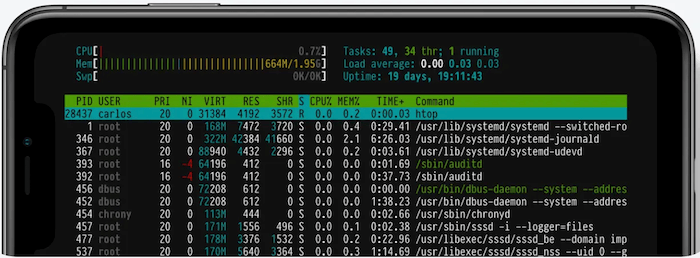
I’m not sure why I haven’t seen Blink mentioned a lot more because it looks quite powerful. If you need to admin a server on the go, e.g. from your iPhone or iPad, this could be the one for you. Plus there are even more features offered if you want to write code also, with an $8/month subscription to Blink Code.
Formspree
To get text data from your customers you often need to use a form. But what happens to the data? This product offers help and has already got spam filtering included.
AI
QuickLRC
I didn’t know this but “LRC” is for time-synced lyrics such as you see in Karaoke machines. This is an AI-based LRC lyrics generator. It also supports broadcast subtitle formats like SRT. It works in 57 languages.
OpenFang
“The Agent Operating System”. Pitting itself against Openclaw, Zeroclaw, CrewAI, Autogen and Langgraph, this is for people serious about using agentic AI rather than casual text, image or song generation. It supports 16 LLM providers at press time.
oMLX

If you understand this screenshot, you are a potential customer
Development tool • “LLM inference, optimized for your Mac” If that doesn’t make much sense to you, this says it is a macOS-native MLX server with smart caching. I hadn’t heard of MLX before, but I can tell you that the smart caching means it doesn’t have to go back online to do the next task, so it’s faster. They say it’s compatible with Claude Code, OpenClaw, Cursor, and any OpenAI-compatible client.
Quickmind
Another in a long line of AI-powered transcription apps, this one can do summaries and create action items from your recording, can identify different speakers and supports over 50 languages. AU$80 a year for this.
Eyedrop
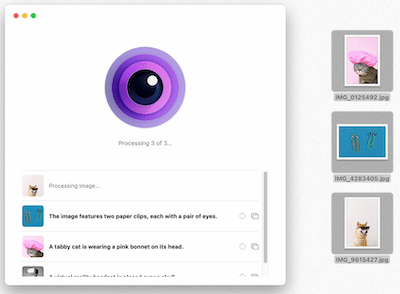
Graphics • Images often need captions, and if you have a lot of them to do it can be a drag. This is a local-AI Mac app that can recognize the content of an image and writes a caption for you.
Hyper3D Rodin
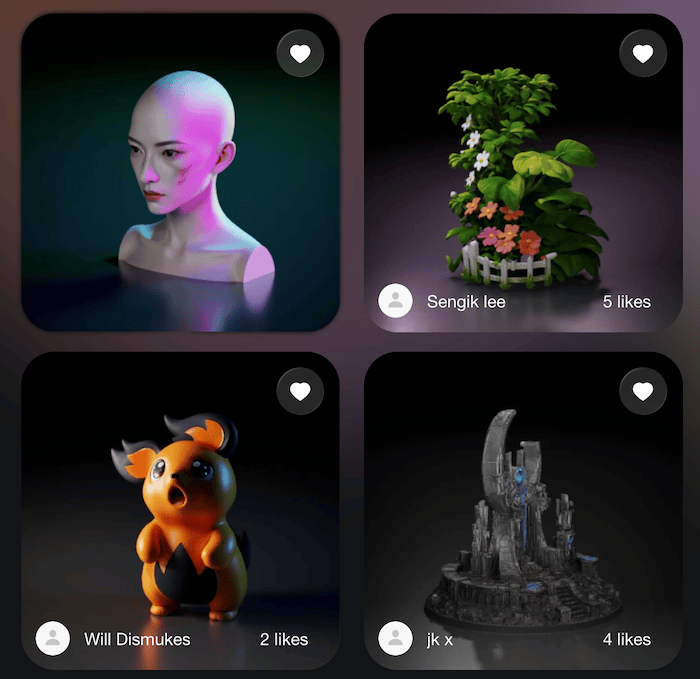
Graphics • AI and 3D meet again. This platform allows you to make 3D models using AI, and export them in obj, fix, gab, usda and stl formats, shaded and in 4K or 8K resolution.
Zaro
Whether you’re in Operations, Sales, Engineering or Marketing, this thing claims it can build custom apps and agents that can interact with your data and do stuff for you.
Aside
The browser that integrates with an AI, so it can do stuff online. I am thinking this might be like Perplexity’s Comet, which after you grant it permission, can click on stuff in the browser to do task for you such as when you’re researching products prior to purchasing. They claim that tasks, memory and data stay on your device for security.
Social Media
Post2All
Schedule posts across X/Twitter, TikTok, Threads, Instagram, LinkedIn, Discord, Telegram, Facebook, YouTube, Pinterest, and more from Claude, your CLI, or the dashboard.
ClearSky
Even though some people seem less than delighted with Bluesky of late, there are plenty of people using it. This tool is a Bluesky Block Checker (to see who blocked you) and Search Tool.
File Sharing
Transfr Pro
Send files up to 100GB for free and with no registration needed, for a week. Plus there are other features like your recipients can preview files directly from the browser before starting a download., but it’s not clear if that needs the Pro upgrade at 12 Euro a month. That plan also holds files for 60 days and has unlimited storage per transfer and total storage.
Dharaneesh20’s FileShipper-FTP
Need to get files from one device to another without any internet access? This open source software — no binary app, you have to build it yourself — works from within any modern browser, auto detects nearby devices and can display a QR code for easy connections.
Internxt
Transfer like a pro
Wondering where that “e” from “next” went
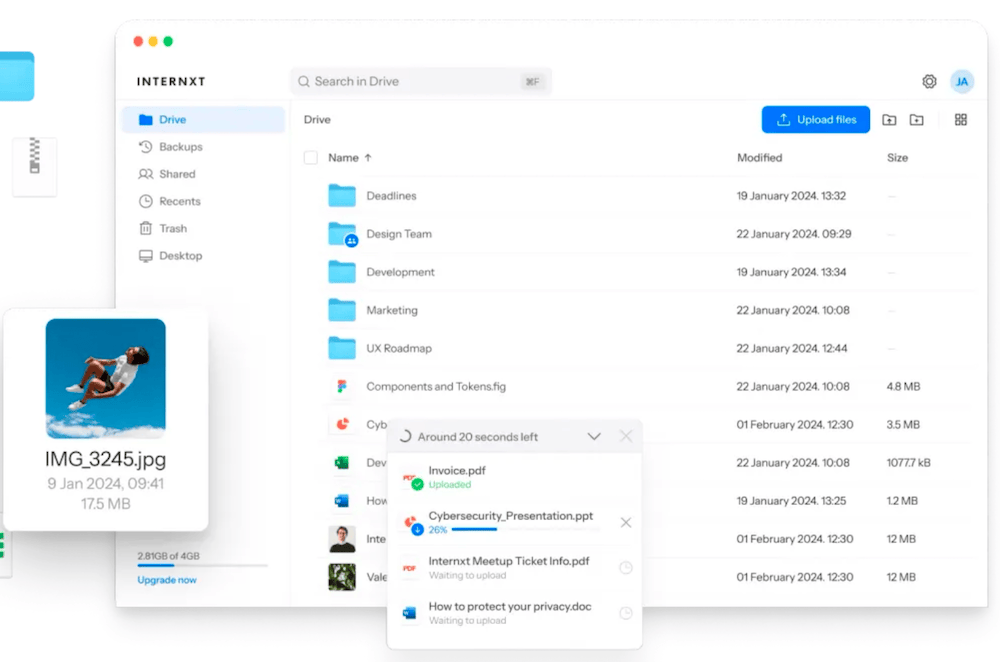
Need to ensure your files are private? This Encrypted cloud storage provider offers 1, 3 and 5TB tiers of storage. The files are encrypted locally before they even leave your computer, so you can’t claim that they saw inside your files. Features include two-factor authentication, computer backup and file versioning once you move to the 3TB plan. It’s pricey though.
Media Consumption
Blurbl
This one might give a few of you that “what is the world coming to” feeling. It hold a selection of classic books and reformats them so that when there is dialog, it looks like the characters are messaging each other like you’d see in a chat app. Each character is color coded so you can easily see who is saying what. I think it’s designed to encourage young folk with short attention spans to read old books that they wouldn’t otherwise try to, and before you get upset just remember that when I was a kid people did similar things by turning old books into comic books. I remember seeing The Scarlet Letter at my school, but I can’t recall if I read the whole thing.
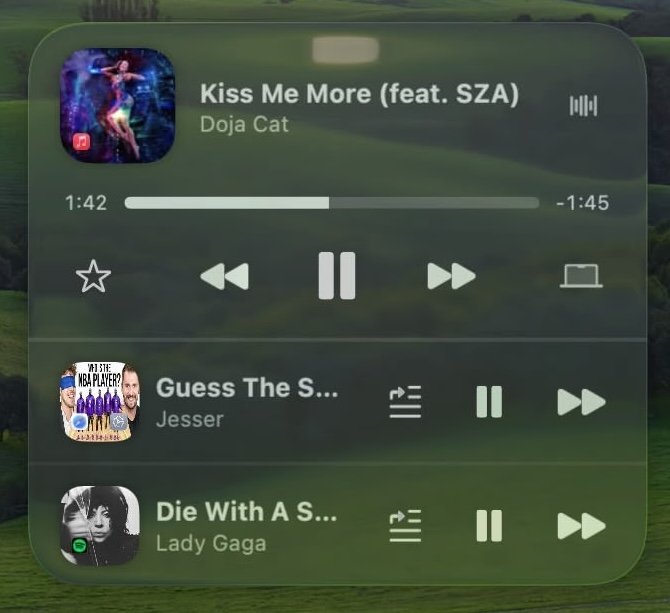
Liqoria is quickoria?
Liqoria
A Mac app that can play from the libraries of Apple Music, Spotify, YouTube or any app that can play in the Control Center. You can play from the menu bar, widget, Dock or the native app.
Cog
An Audio Player for macOS — this thing has a huge list of supported filetypes, so if the audio you want to play is in a hodgepodge of formats from the last 30 years — including SoundFont and DLS files — check this one out. It’s free and open source.
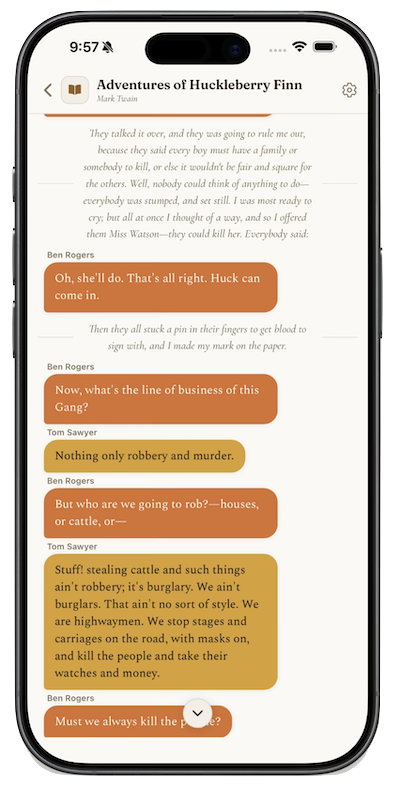
Read old books like they were texts from your pals
You have reached the end of this edition, and now it is time to go back to work, having saved a bunch of new things you can check out later. Remember if you make something that has an interface, please post a nice clean screenshot of what it looks like so we can get an idea of what it’s like to use.