
This edition offers:
Music • Samples • Fonts • Mac • iOS • Graphics • Animation • Video • Development • AI • Social Media • Training • File sharing and Media Consumption.
Boatloads of stuff to get through this issue. So many I have omitted the Work category until next time. Hope you find some cool stuff — I did!
Music
At some point I was posting items within the month that they were released, however I have fallen behind so it will be no surprise to me if you’ve heard about these in your travels elsewhere, if you travel elsewhere. That said, I find items in all corners of the internet so there is still a good chance you haven’t stumbled across some of these before. There’s a lot out there.
Dawesome SOL
A “textural ambient reverb” by Chris Bryant who publishes other plugins on Gumroad as S1gnsofL1fe. It’s free.
DirektDSP Chasm Diffusion
A delay and stereo-shaping audio plugin created in collaboration with electronic artist Korzana. I can’t tell you any more about this without installing the demo, because their site has no other information. They also have three other plugins — compressors and distortions — as freebies.
QuietFormat Meltone
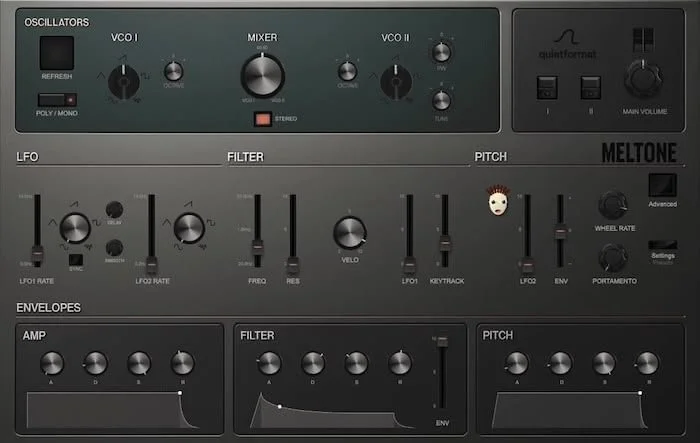
A polyphonic modeled analog Synth with a built-in GILLA ARP. I don’t know if I should know what GILLA is, as I hadn’t seen that word before, but it turns out it’s the name of a musician that devised this arp. The short demo video doesn’t really do it justice so listen to the interactive player instead. It does support Pitch MPE if you have a device that outputs that. There are a few iOS apps that can do it if your MIDI controller doesn’t, or use Abelton Live. What this means is each note in a chord can have the pitch glide independently. Compare with Pitch Innovations.
OBSO Circle Cynths
The “obso” part of the name stems from the word “obsolete” as this synth is made from “various forms of obsolete media and extant technology”, thus a retro sound. It offers 120 unique patches in categories including Bells, Brass, Strings, Keys, and Pads, and the presets use a tagging system.
Sesh
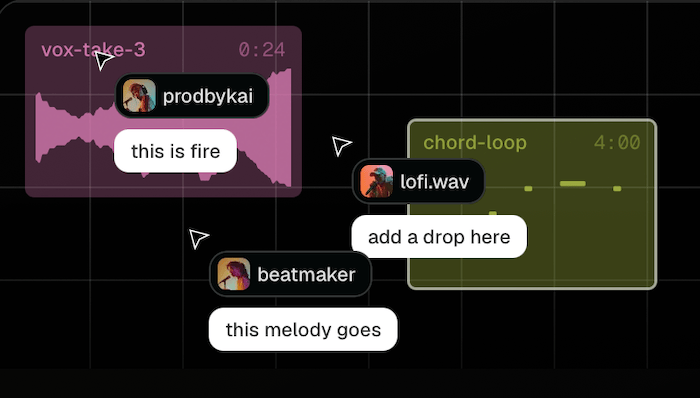
If you work with productivity or office apps that support realtime collaboration you’d have noticed that some of them show you the cursor and avatar of your collaborators in realtime. So here’s a music app that employs that technology for writing songs. It includes a step sequencer, a synthesizer and DAW-like arrangement tools. You can also chat from within this product to avoid having to switch back and forth with Slack, WhatsApp or other chat apps. There’s a free starter tier to try it out, then move to Pro for US$5 a month.
Sampleson Twinkle

This is a plugin for playing harp-like glissandos by dragging a mouse over a scattering of note icons set to up to two scales. There have been more of this type of thing on iOS due to the touch interface, but now you can have one on your computer without having to hook up an iPad. Good for dreamy sequences or some aleatoric tension builders.
Kompose Audio Subfurno
This is an expansion pack for the free Audiomodern Soundbox audio engine. It’s for making dark, ominous soundscapes.
ChordBloom
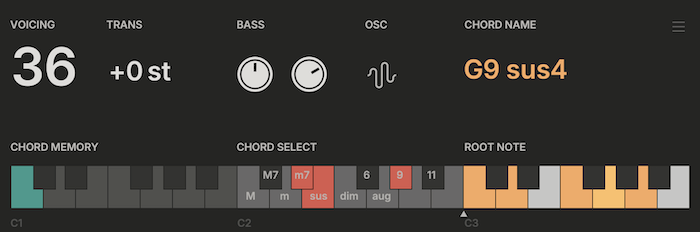
“Explore chords, discover progressions.” This will bring the number of plugins in my library that play chords with single note input to eight. But this one is free.
Raccoon Audio EchoSnack Delay

New-to-me developer Raccoon Audio asks US$100 for this delay. It goes beyond your standard ping-pong type stuff and becomes dynamic with all the parameters that can be modulated: the key here is that any rate knob with a round LED can flip between fixed motion, Mutate drift, or tempo-locked sync.
Haven Audio CODA
We often want “Punchy Mixes” and this free plugin offers to help you achieve that.
Isivisi SLURP
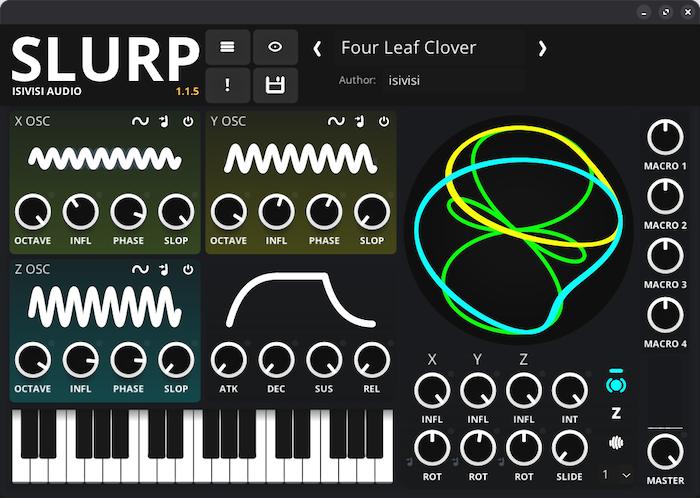
This indie developer offers a synth that combines easy-to-approach FM synthesis with spatial dynamics. There’s a lite version for free to get you interested, then the full version is a mere US$20.
tiagolr’s ripplerx
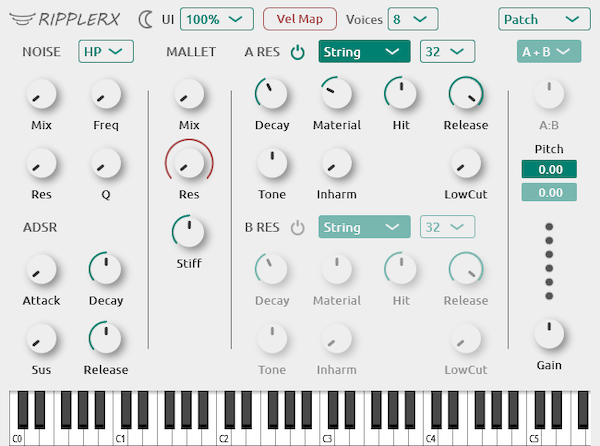
This is an open-source lite version of reFX’s Rippler. It’s a physically modeled synth, capable of sounds similar to AAS Chromaphone and Ableton Collision, the latter of which I haven’t tried yet.
Nuro Audio Supernova

Reverb • An algorithmic reverb that offers 62 algorithms to give the illusion of different spaces. Apparently these algorithms are new and therefore sound better than what came before them. Two hundred presets are included to help you find your space.
Novel Music
These folks make a number of Max for Live Devices, so you either need Max or the full version of Abelton Live to use them. Names like Seeds, Antenna, Catch, Venn, Staircase, Travelogue, Aisles and Deviate should make you curious, and the latter is free.
Samples
Ovani Sound
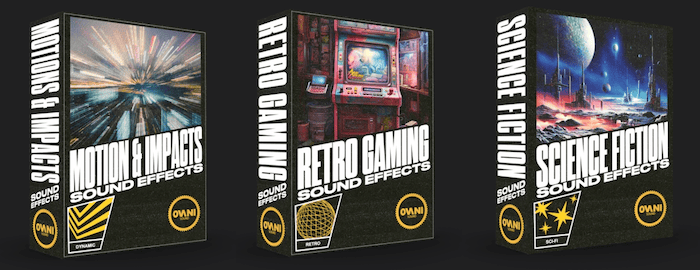
A vendor that offers sound effects aimed at game makers, but obviously for movies too. Their start pack includes Hollywood Action, Medieval, Science Fiction and Motion & Impacts. You can also have a custom bundle created by adding search terms you need for your project.
Circles Audio
These folks do mainly drum loops and one-shots, but you might get a few odds and ends included depending on the pack. They also do a plugin called Circles which offers independent control of each kit piece. Plus pitch, width, velocity, mic levels, tone, transient shaper, delay, reverb, drive, choke groups, volume & pan.
Minta Foundry
A bundle that includes 17 Royalty Free Percussion Loops, over 50 Percussion, 71 FX and 20 tuned One Shots, 10 Melodic Loops, 19 Ambient Sounds, 30 flute chops, 10 flute loops and 9 long notes.
Signature Sounds The Signature Soundbank
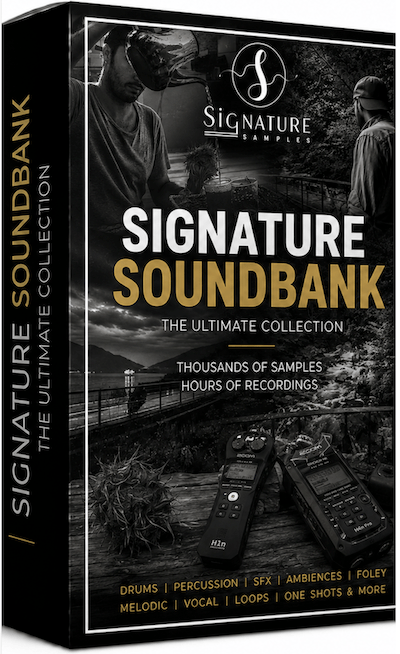
Over 80GB of samples comprising over 150 sample packs of original field recordings, foley, percussion, drum loops, sound effects, textures, ambiences, one-shots and creative production tools. I couldn’t find any demos though.
Zapsplat
One of the “we do it all” sample library vendors. They boast over 160,000 sound effects, over 700 SFX packs and over 800 royalty free music tracks for commercial use, but attribution is required. It seems to be subscription based at £30 a year.
The Port Zero
This seems to be a combination of 6 songs from a musician called Canoto and a sample pack consisting of 30 Serum 2 Presets (of course) 5 Bass Loops, 24 Bass One Shots, 7 Full Drum Loops, 14 Claps, 12 Kicks, 22 Cymbals, 11 Snares, 5 Atmospheres, 4 Effect Layers, 4 Risers, 9 Impacts and 5 Pads.
Odd Frequency Exo Full Bundle

Boxes not included
This is for writers of the Melodic Techno genre and gives you a large pack of 2.4 GB of sounds with over 400 unique samples. They also do a Full Access Bundle.
Dejansoundkits Cynosure Multi Kit
These folks have made a pack consisting of over 375 analog-processed sounds such as drums, one shots, textures, soundscapes, vocals, phrases and noises.
Stickz MACHINE 909
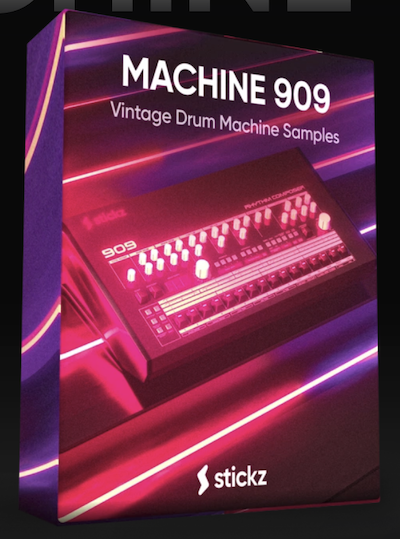
Over 600 TR-909 drum machine samples that are good for Tech House, Speed Garage, UKG (I hadn’t heard of that one), Deep House, Electro House or Techno.
StickyFX
A vendor from the Netherlands that offers many libraries of sound effects. There are some freebies you can try out.
Fonts
Swartz Gothic

A quite chunky, strong sans serif headline face by Daniel Swartz. Lots of glyphs are included and it supports many non-English characters and accents.
TypeTray
I’ll sneak in some font software (for macOS) in this section because if you’re here you’re more likely to find it then if it was in the Mac or Graphics section. This one is for previewing your font library without installing the font, plus it supports dynamic checking of variable width fonts.
Josh Puckett’s Pica
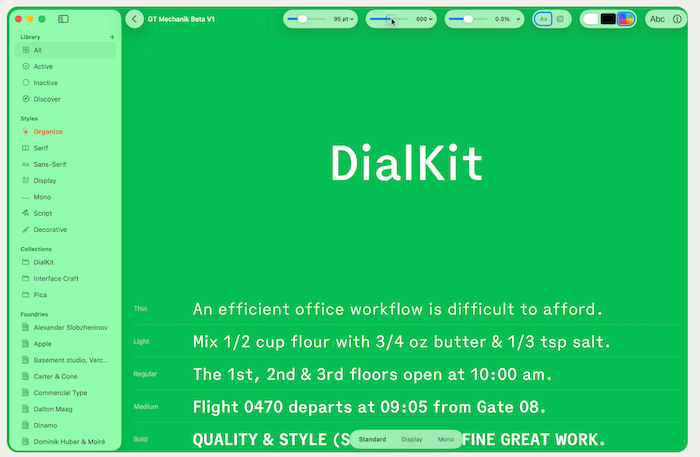
Another font management app that is so new it doesn’t even appear in the comparison table on TypeTray’s site. This one lets you test your font on a colored background too. Warning: it needs Tahoe as a minimum OS version.
Fontjoy
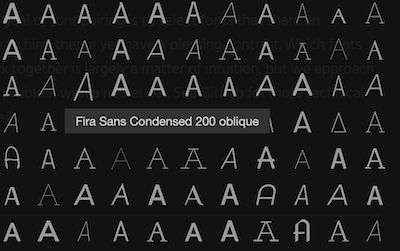
Web tool • Picking two fonts that complement each other can be a drag. This tool allows you to generate a font pairing, and like some music plugins you lock the one you like and pick others to match it. There does not seem to be a way to download the fonts or visit the vendor’s page from this one, but it looks like many of them are in the Google Fonts library. Also cool is this 3D font similarity visualizer, but I’m not sure how useful it is. They also do a Logo maker called Brandmark.
OneK TubularXS
A very funky, intentionally highly unreadable display font that may be better used as graphic elements than to provide information to your viewers.
Fairetype
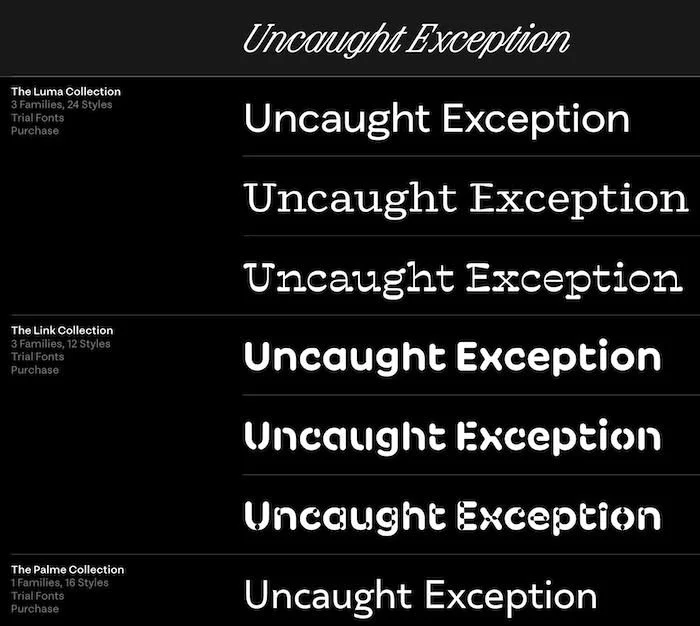
A foundry from Brooklyn, USA who offers a medium sized range of mostly elegant, useful faces. The website is nice because as you can see you can test your text with their fonts.
Typeheist
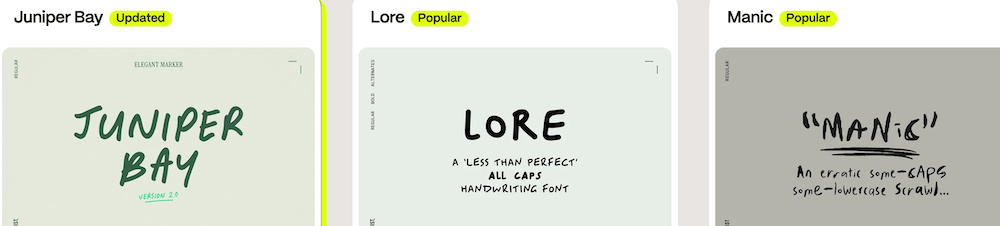
A decent sized collection of handwritten and/or fun display faces, all affordable. The handwritten styles range from friendly to disturbed.
B612
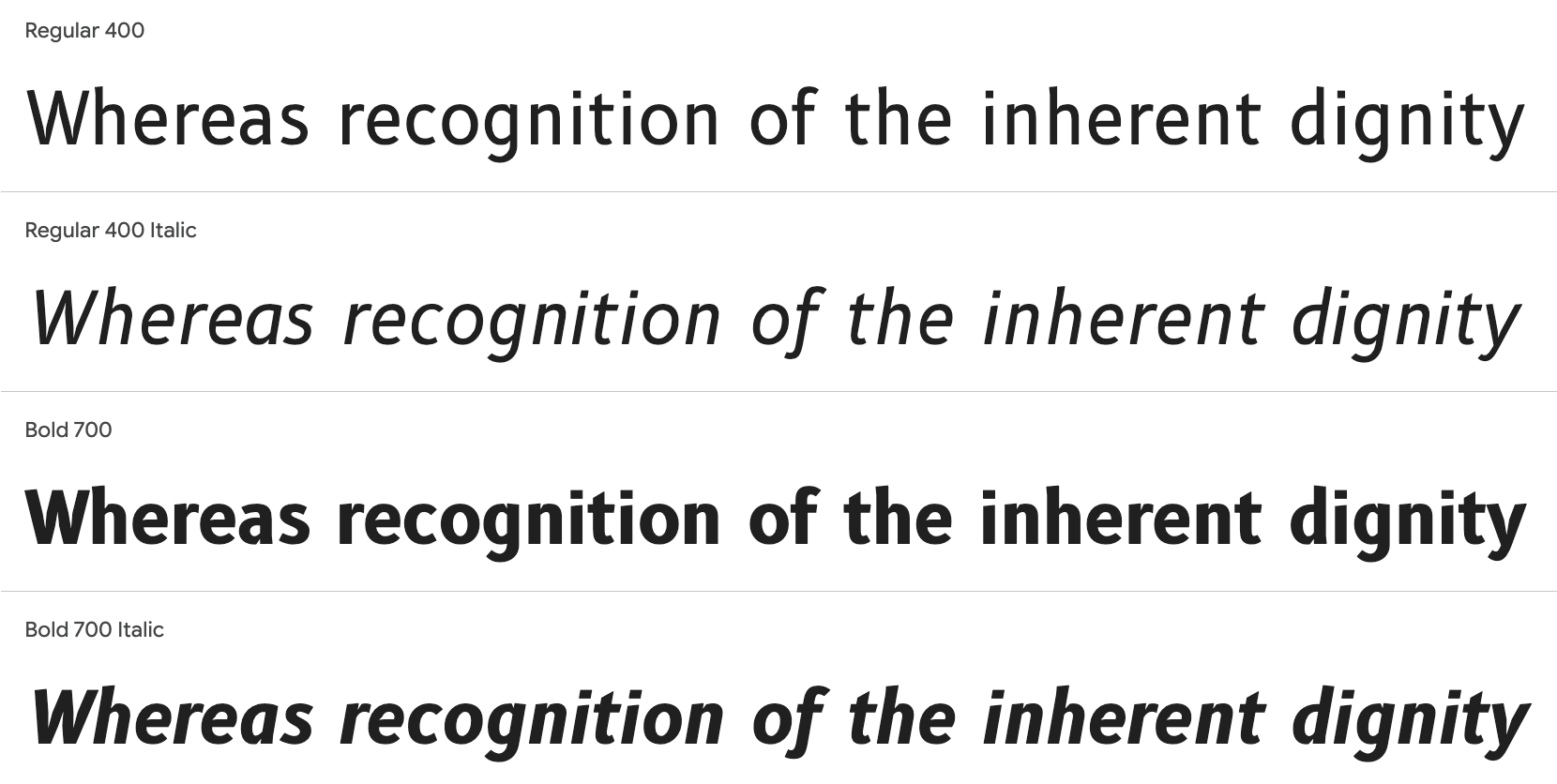
A free sans-serif font designed for maximal readability. I think I’ll tighten up the tracking though.
Simplebits Kyroh
This foundry makes a small range that I call impactful headline or poster fonts, but they have lots of rounded corners so they seem friendly. Kyroh is an all-caps offering with a rare hand-lettered quality to it, so good if your design needs something unusual.
Want some more sweet fonts? Check out the range of classy fonts from TypeType. Click the sample below to visit their site.
Mac
TabTab
People love keep ing lots of tabs open. Or maybe they have to for their job. And then switching to another app and back and forth between those tabs can get confusing. Utilities like this one are for jumping between tabs and apps. It reminds me of Contexts which I have enjoyed for a few years, but it has stagnated. The developer needs to be careful because — now here is a sentence that only Mac UI connoisseurs like you and I will understand — this app may be Sherlocked by Raycast or similar products.
NextPad ++ (formerly Notepad +)
This is a free text editor which is a clone of NotePad +, formerly for Windows only. So if you were lusting after the features in that but only used a Mac, now you can have them too.
KeyClu
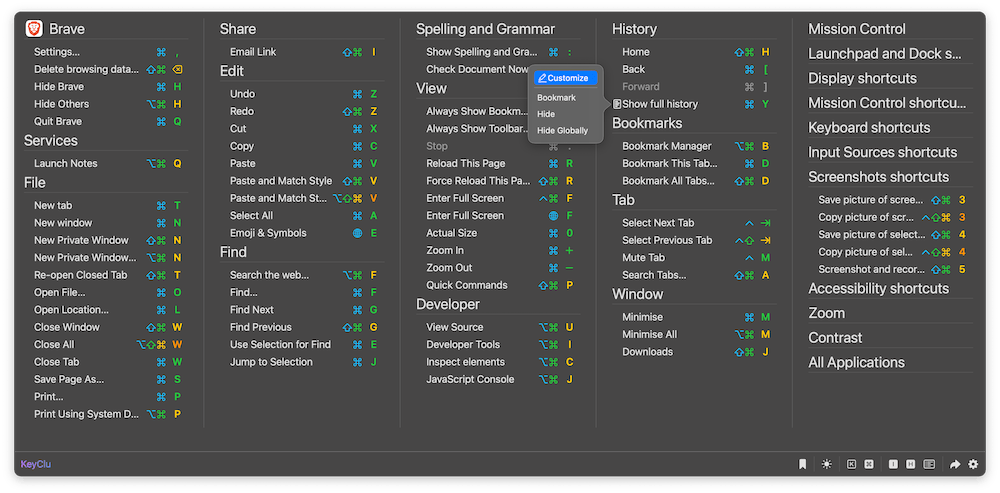
Ever get overwhelmed by all the keyboard shortcuts buried in all the menus of an app you use? For a while all that was available was Ergonis’ KeyCue, which I own and use from time to time, particularly when learning a new app. This is a free clone of that app.
Monologue
Their copy on their site says it all: it “brings voice dictation, voice notes, and bot-free meeting transcription together in one app for Mac, iPhone, iPad, and Apple Watch” They claim it will work anywhere you can type.
Parachute
These folks make a suite of two utilities for backing up your photos from iCloud to your local storage, in case you want to be able to shut the subscription down at a moment’s notice. They also make Photoscope, an iOS app for culling unwanted photos.
LinearMouse
“The mouse and trackpad utility for Mac.” If you have, say, a Logitech mouse and want to avoid the messy software they offer to customize it, check this out.
Tolaria
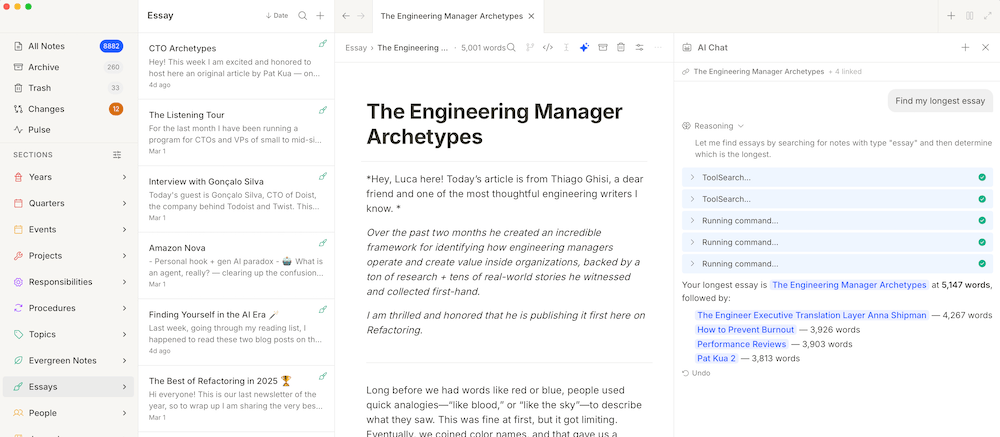
“A second brain for the AI era” Write notes in Markdown, and you can integrate Github and Claude Code, Codex, OpenCode, Pi, and Gemini.
Zoundry
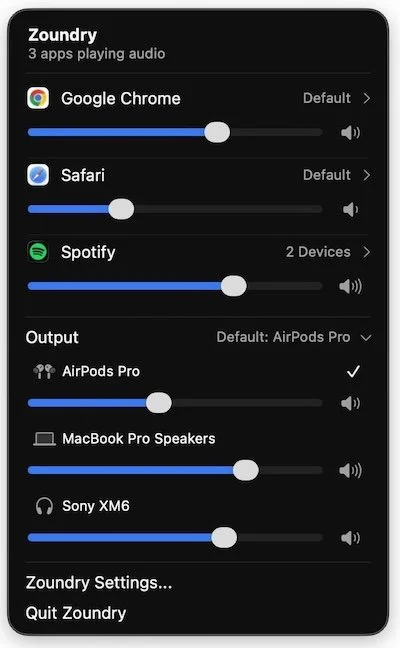
Once again a developer has found an often-requested feature that Apple neglects to include: per-app volume control.
Synium Software DockThings

Launcher Utility • I find it sad that the maker of the venerable DragThing thought it was unfeasible to rewrite it from scratch to make it compatible with modern macOS, and now there are several in this category that have popped up in its wake.
Drawers
“Flow without distractions” You know me — I love interface utilities that expand on the hard work that Apple has done over the years and takes it to a new level. It probably has bothered the developer of this app for a while that once you switch spaces you still have the same old Dock with a bunch of icons you don’t need in that Space. Drawers disposes of that limitation plus it offers independence to each app in there; clicking an icon of an open app doesn’t take you into a different Space. Plus there are other launcher type functions. I wonder what James, author of the abovementioned DragThing thinks of utilities like this.
Atlas for Mac
With so many products around eventually you find ones with a name clash. No, this one has nothing to do with Atlas, the rhythm plugin. This one says it’s an inspiration library. There is nothing else about it on the site except the price and that it is a Chrome extension. If anyone has any more information about it, please send it to me.
tinypad
Over thirty years and we still haven’t settled on what we want a browser’s home page to look like. This aims to make a nice clean page with icons for your favorites, separated into categories. It works on Safari and Chrome, but because it’s rare to have something that works in Safari it’s here in the Mac section.
Duobolt
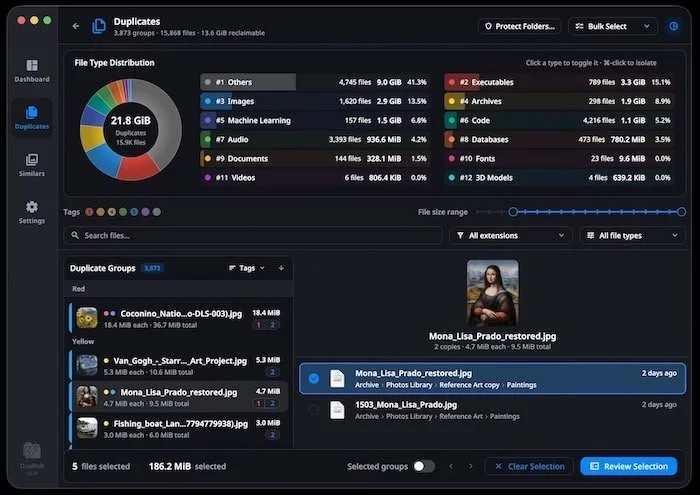
Utility • A duplicate files finder that does byte-for-byte matching so you are only culling exact duplicates, unlike others that go on the metadata of the file. You can try it out with a free lite version that does 25 files at a time.
Clickfit
Window Manager • While Apple themselves have been slow to add more window management features — opting instead to go for more severe options like Stage Manager — third party developers continue to refine the experience of using freely draggable windows. This one offers a ton of features including gestures to “throw” a window into a slot while holding down a hotkey.
Awesome Copy
Clipboard Manager • Another in the category of clipboard managers, this one rivals iClip because it shows you a larger preview of graphic items that are on your clipboard. Pity I didn’t find it earlier because I finally bought iClip after many years and found that although it works, it needs an overhaul to its interface.
FFFFinder
This is said to be a Finder replacement but it’s really more of an image viewer. The developer Anton Repponen was frustrated with not being able to see the images down into all the subfolders into which they were neatly organised without having to open each one. This idea isn’t new, I’ve owned Leap for doing this for years. However unlike Leap you don’t have to do a search and it also looks more straightforward to do your browsing. You can also flick through larger thumbnails at a snappier pace, and you have some options to sort the contents — although when you tell it to show them in order of each folder, there is nothing to distinguish which folder they’re in. If you have a lot of images to browse, check this out.
FrigadeHQ’s yap
A free, open source voice dictation for macOS. On-device transcription with Apple's Speech framework. No cloud, no API keys, no account.
iOS
Quill Flow
Here’s a dictation tool that has been done as an iOS Keyboard rather than a standalone app. It’s AU$55 for a year or just go for forever at $100.
EmailZap
Email client • This one offers a now-common feature of being able to manage your tide of emails, sorting them into categories for you.
Theodolite
One for the nature lovers, or people who work outdoors. Yes, it’s 14 years old, but you might not have heard of it. It is a multi-function viewfinder that combines a compass, inclinometer, rangefinder, GPS, map, nav calculator, and geo-overlay photo/movie camera.
Sortible
Photo Sharing Utility • These developers must have found some features that Apple didn’t offer in the Shared Album feature of iCloud Photo Sharing. Perhaps one of those is that you need to be paying for iCloud! This app lets participants to share photos and download albums. Three for free, 10 for AU$10 and then $30 for unlimited participants.
Now we’ll finish up with a popular category in iOS apps, calendar/todo list
Spanarc

What makes this one notable is that it appears to offer some data visualizations of your appointments, and also offers a Kanban-style view of your upcoming tasks.
Anyschedule
A combo calendar and todo list app that includes natural language event creation, widgets and task streaks in a clean interface.
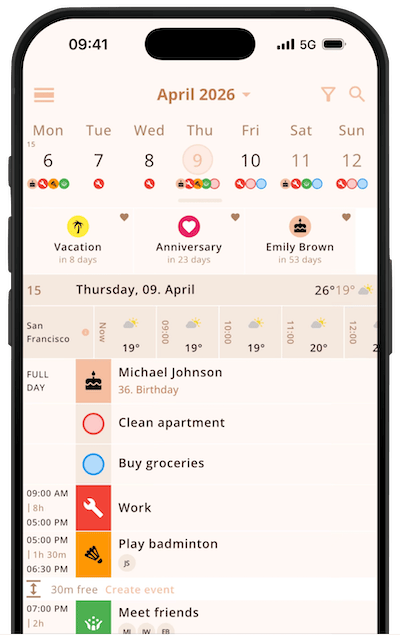
This one aims to be more than a standard calendar and goes for the moniker Life Planner, as it includes reminders and alarms for things like keeping in touch with certain contacts. On the subject of calendars, also check out
ThisDay
You may have noticed that tasks, events, notes, voice memos, photos and habits can be all over the place in different apps. ThisDay aims to be a central point for all of these and any item can have a reminder made for it. For Macs and iPhones. The link on the app store has no “open in App Store” button and I couldn’t find it in the Australian store, so I don’t know what is happening with that. It’s frustrating though.
Kan Do: Project Management
Want more from your todo list app? Have a look at this one, which has all the usual features but also Kanban layout like Trello and Todoist have. It supports markdown in the text field of each task for extra flexibility. Not to be confused with:
Kando
A circular user interface utility which I’ll cover in the Mac section soon, or
Kando
Which is a Safari extension for using with Microsoft ToDo.
iOS Music
Niosh Sound Level Meter
If you work at live gigs and need to know the decibel levels, check out this free app for iOS. It supports many standards of hearing level metering and supports Apple Health's hearing module.
Raw Byte Audio Machine
Make music with math! Experimental music that is. This one is for manipulating the waveform with code.
Omni Pocket Synth
A MIDI processor plugin that can also work standalone for playing chords, strums, arpeggios and more. AU$15 to jump to the Pro version, but I don’t know what that provides.
Backrooms Piano
This developer has made a piano plugin/app with various forms of degradation in order to achieve a nostalgic, creepy or shoegazy tone, useful for setting a mood. They mention “dreamcore” as a genre suggestion, which I like the name of.
Spellsynth
The developer may not be able to use “Speak-n-spell” in their description, but I can. This lets you get the sound of that old educational kids toy in your music.
Delay Line
If you like playing with delay parameters in realtime during a jam or live take, check this one out. It has been designed to make smooth tape-like transitions between the delayed audio path, so no more unwanted stuttering. Plus it has a simple 3 knob interface. Another delay to have a look at is:
Delay Pedal
As the name suggests this is inspired by vintage delay pedals. It can form delays up to 2 seconds. Works standalone or as a plugin.
Ambiotica
As you might have been able to tell from the name, this one is for making ambient music. It’s a plugin and standalone app that splits the incoming source audio into two paths, one is a looper with a granular effect and the other is a “micro-loop”.
MIDI Motif Maker
A generative music plugin/app that does not use AI for its maths. It sends MIDI to your other instruments. Several genres are offered, and it has 15 scales and 15 ways to alter the motifs it creates. While we’re on the subject of MIDI generators:
MotifPilot MIDI Generator
If you don’t do live jams and prefer to export MIDI parts into a DAW like Cubasis, this one can create 4,8, or 16 bar parts in a variety of genres. Once again, a non-AI based system.
iKeleton
It's hard to know what category to put apps like these into. This one captures body movement data and can convert that into OSC so it can be sent to another device, for example a music app which also supports OSC, so you can then change MIDI CC values in a synth. But other stuff like some audio visualisers also support OSC, so there are many possibilities here. Basically turn movement data into something else… it's up to you.
Malleable
On the border of being a development environment and an instrument are apps like this. They expose a coding area so you can get under the hood. It reminds me of two other apps, one of which is Scaper, with some of the modularity of Audulus mixed in. Unfortunately for me when I look at code it seems to shut down the musical part of my brain rather more than excite it, so I shall not be partaking in this one.
Polybeep
Another in a series of apps that have taken in the concept of loops being represented as geometric shapes. This one reminds me of UVI's Percussion Factory in the sense that the shapes are shown separately rather than concentrically as in some other looper apps. This one can have six loops and you can add your own samples. It appears to have been designed to export the whole thing as a single audio file rather than as stems, and also it does not support AUv3 so it can’t be used in your DAW directly. The developer says MIDI control is coming in a future update.
WBTRK
This is another app that uses the old-school tracker interface.
Oktopus Synthesizer
A synth for iPad, standalone or AUv3 plugin, which has all the usual synth features and 10 onboard effects but also includes rarer features such as sample import, and being able to import images and convert them into audio.
mSteps
A fully-featured MIDI pattern plugin.
MooMu
A visual modular synthesizer and drum- machine step sequencer aimed at live performance. It works as a standalone app or as. An AUv3 plugin.
Foam Synth
Rather than just modeling strings or bits of metal that have been hit with something, this synth is inspired by bubbles and other organics. You can get some quite unusual sounds out of it, so it’s probably best for sound design, experimental, or artistic pieces. I read someone else comparing it to Hainbach’s B00GA.
Fishtail
This is a composition app. It’s purely for sending MIDI to other instruments, usually within a DAW or live-jamming host such as apeMatrix or AUM. I found the interface too confusing to even get started.
ICYMI
Polychord
This one has been around for a while. It is a utility app for playing chords with single taps. I am listing it here because it now has a new feature: MIDI input. Which means you can use another device or app to send single notes to it and it will play chords.
Graphics
care4art (Julian Herbrig) ATMOS Pro Suite
Asset pack • 233 Photoshop Overlays & Brushes that are compatible with Photoshop, Elements, Affinity, Pixelmator Pro, ON1 and other graphics apps.
Aftershoot
Photo editing • Aftershoot isn’t new, but this is their upcoming RAW-capable photo editing software. It uses an AI backend to help you edit.
Scamp

This is a Figma alternative for web developers or website designers which writes the CSS as you design. It also integrates with Claude Code, or any other coding agent via a built-in terminal that opens in your project folder. On the border of being in the Graphics section or the Development section, but it’s about how it looks so here it stays.
Dither Garden
Web tool • How times have changed. Once, dithering was used because our computers weren’t high-res enough, now we want it as a retro effect. This one supports 15 dithering algorithms and 4 color effects, and can export in PNG, JPG, WebP or TXT.
Effect.app
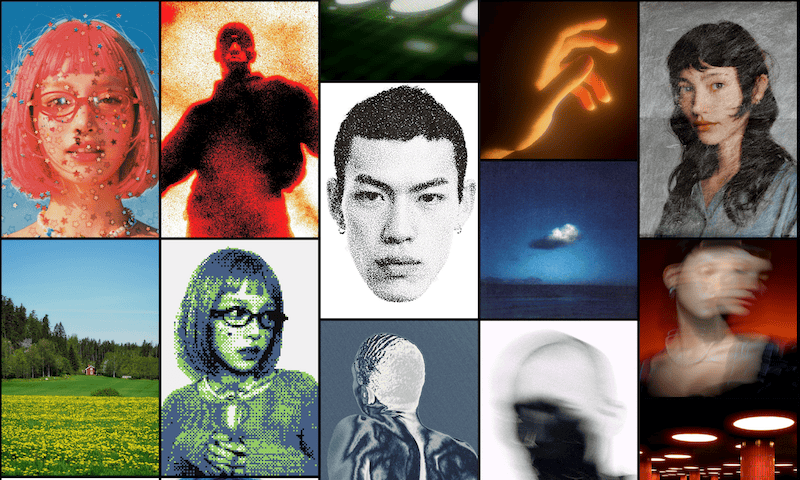

Web tool • I love effects! This offers dozens of effects each with their own parameters. You can upload multiple images in layers then apply the effects and filters and reorder them. Export in 720p for free or move to Pro for US$12 a month to get 4K and Video.
ArtBxB
Web tool • This is a web app for helping you draw or paint a copy of another image. It can break up an imported image into cells and then you can draw/paint each one and mark when you’ve done it. You can also change the brightness and contrast of the reference image and then take a photo of your painted piece so you can compare it with the source.
Icons95
Do you need icons to look like they’re over 30 years old? This is the pack for you. There is also a companion font for completing the retro tech look.
Element
“Everything you loved about Aperture, only better” Lots of people were saddened when Apple discontinued Aperture, and people like the developer of this have tried to make a clone of it. But this one allows you to import photos from cloud services such as Google Drive, Dropbox or iCloud so you can share your projects. It’s US$99 — no subscription.
UI.camera
“Product photography for software” You know those shots of a software’s window that kind of look like they were taken with a camera pointing at a monitor? This utility lets you fake it, using artificial blurring and faux-3D angle editing.
VectorStyler
This one may have been around for a few years, based on the version of macOS it is compatible with. It can import Illustrator files and is a USD$95 one-time purchase — no subscriptions!
Texture Labs
Textures galore! They are a crucial part of many designs, not just for 3D. This library includes all the usual categories including skies. They appear to be free for commercial use, as long as what you make is not a product for making other graphics (or selling them of course).
While we’re on the subject of texture labs, I also found
Texturelab
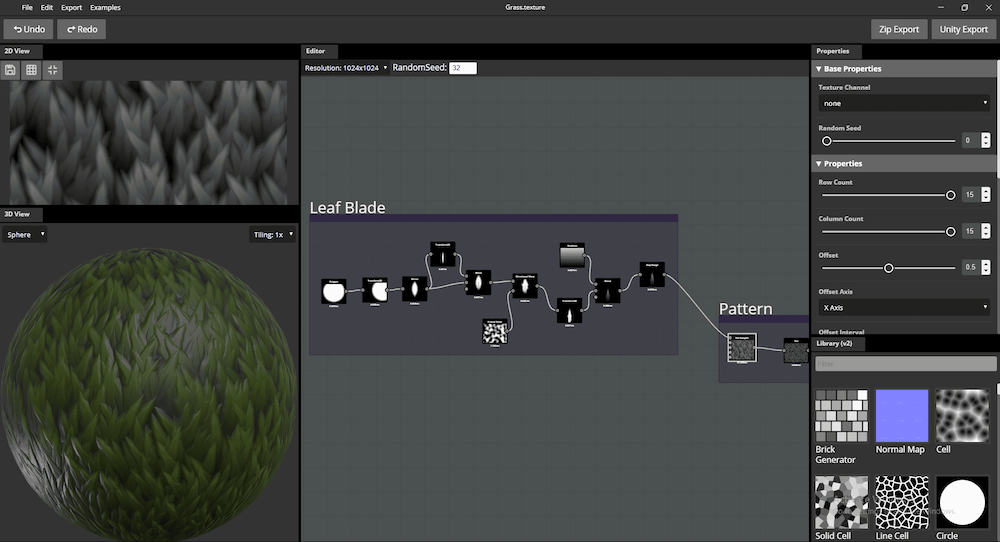
This is a node-based texture creator app for Mac, Windows and Linux which is open source and for making “beautiful, tileable, physically-based textures”.
Then we have
Polyhaven
Asset Library • Polyhaven is “the public 3D Asset Library” which has models, textures and HDRIs that are all usable under Creative Commons CC0.
The Graphics Fairy

Asset Library • nearly 7,000 Free vintage images, graphics and craft clipart.
Ladybug

Web design framework • Does your site need some of those funky effects that dynamically change when the user moves their mouse? This is worth a look. Free to play with and US$120 a year to use in commercial projects.
Tiny Tapes The Ultimate Lut Pack
LUTs are an essential ingredient for getting your footage to have the right feel. This is a pack of over 285 of them to get all kinds of colors into your video. They also make a number of other assets as well as offering some training courses for video and audio editing, but I found this first so they are not getting another entry in the Training section.
Stills

A free plugin for Figma that allow you to access the Stills stock photo library from within Figma. This is from the group that does Filmsupply and Musicbed which I mentioned in TMF 23, but I didn’t see they do this too.
U&I Software Artmatic
If you have been around for a while you may remember the music app MetaSynth. This I say the same folks, but with is a graphics and sound engine for making all kinds of wonderful items, from abstract art to textures to — sorry to say dated — 3D rendered images like what can be made in Blender or Maya.
Video
OpenReel Video
Tired of paying for Final Cut or Premiere and don’t like Resolve? Try this open source video editor. Github direct link.
Pixpair Ultimate Liquid Glass Plugin For Davinci Resolve
If you need the much maligned Liquid Glass look in your video, check this out.
NeoEditFX Animated Text Pack
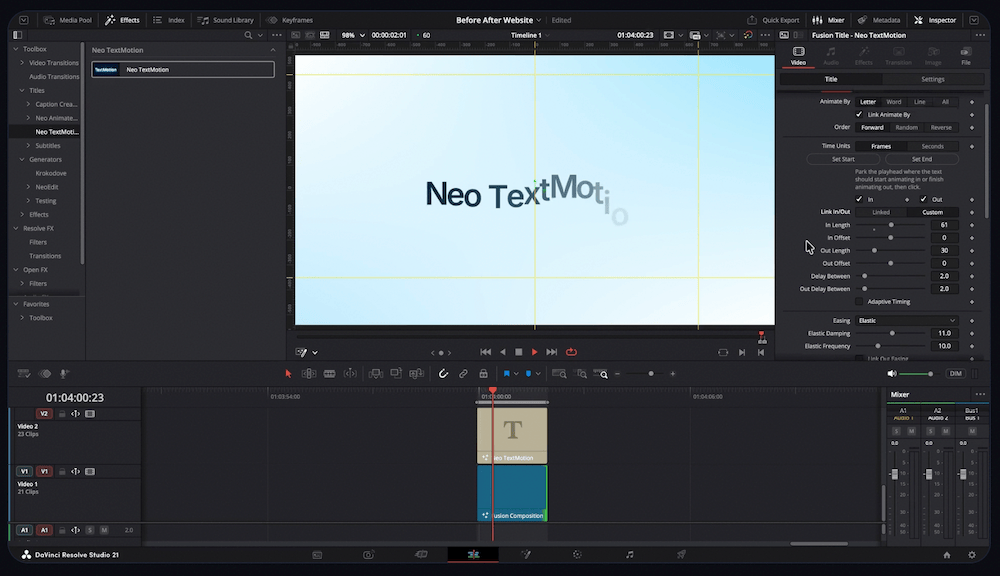
NeoEditFX is a company that makes plugins for Davinci Resolve. This one is for animating text and it has a ton of options for getting it to look how you want, unlike some of the other plugins around where you are limited to what attributes they have set as variables. Check out their other products for captions and other effects.
QuickMagic
The merging of AI and 3D continues. This is an AI-powered web tool for creating 3D models from your uploaded videos or text prompts. The models can be exported to FBX, BVH, BIP, C4D, VMD, Mixamo, UE5.6, Character Creator & iClone, Roblox, OnlyFace and UniRobot for Blender, Unreal Engine, Unity, Maya, 3ds Max, MotionBuilder and more. The funny thing is they used AI to create one of the promo screenshots and it has errors in it. But the videos of what it makes looks pretty good. I think this type of tool is going to be one to watch.
Retrofi

You need some shots that look old? This is how to do it. This is an asset pack consisting of over 400 “hand-crafted” flash frame transitions, sound effects, film burns, film grains, overlays for social media and other aspect ratios, grain and dust overlays and of course LUTs to get the aged color grading.
Productioncrate
Looks like we’ve hit the motherlode for visual effects. This massive site offers too many assets for me to list fully including magic effects, explosions, fire, debris, muzzle flashes, motion graphics including textures and overlays, transitions, royal-free music and sound effects, a range of 3D models, and HDRIs (High Dynamic Range Images) for compositing. There is also a Blender import plugin and the LaForge Suite which is over 20 AfterEffects plugins. Try out some 3D stuff in the browser at Character.
Century Creatives Motionprep
A free tool for Motion users which lets you “publish/unpublish multiple parameters and organize them in bulk inside Motion”
ICYMI
FXFactory has been around for a while, but in case you are new to this video stuff here are some interesting plugins they make:
Grunge Text Background, Impackt, Spectrum, VJTools, and UtilityKit
Development
Remino Scrollerful
You know when you scroll on a website and the text animates? If you like that effect then this can help you achieve it. It’s a Small JS & CSS library for scroll animations.
app-deploy-kit
Apparently Apple is strict with screenshots to be uploaded to the App Store. This helps make them in the right sizes.
Ventoy
Utility • This is for creating bootable USB drives. It runs on Windows, Linux, Unix and ChromeOS. You just copy the ISO or other image formats to the stick and run it and it makes the drive bootable. Copying multiple images will add a boot loader to the drive so you can choose which one to boot from. I don’t have a general software section so it has to go here in the Development section. Github direct link.
slidevjs’s slidev
Presentation slides for Developers.
AI
Raelume
Generate images, video, 3D, audio and apps from many popular models on a node-based canvas.
Netflix’s void-model
VOID stands for Video Object and Interaction Deletion. So you can use it to remove things from videos, and it figures out not only what things should look like behind the object but what the scene would look like without the object — including some basic physics.
Quickchat AI
“AI Agents for Support, Sales, and Operations” they say. The example looks like those chatbots you get on websites for shopping or for support about something you already bought. I’ve seen several of those that are downright useless so let’s hope that whatever Quickchat makes are an improvement.
Quiver
It has taken a bit longer for AI software to tackle vector graphics. Perhaps it’s a more difficult problem. Anyway this one is for generating editing and animating vector graphics.
Higgsfield Photoshop Plugin
You’re not stuck using Firefly anymore, or going back and forth from Higgsfield to Photoshop.
DeerFlow
As you know I don’t prefer to copy and paste from their sites but their description is it’s “an open-source […] framework designed for deep research and efficient workflow automation. [It] combines large language models with […] web search, crawling, and Python execution, enabling users to build powerful agent-based applications and research pipelines.”
Ability.ai’s Trinity

Trinity runs Claude Code, Codex, and Gemini CLI agents side by side all on your local hardware.
Santinic’s Audiblez
Audiblez is for generating audiobooks from e-books. I don’t personally sanction this use of AI because there are a lot of people with microphones who could be recording audiobooks as a side hustle, but I can see that this is a lot quicker than waiting for companies to record their back catalogs.
Fable AI
I thought this kind of thing would have gotten more popular faster. It’s an AI-backed text-based gaming platform. The AI remembers things you or your other players have done — it seems like some of the games can have multiple players.
Blume
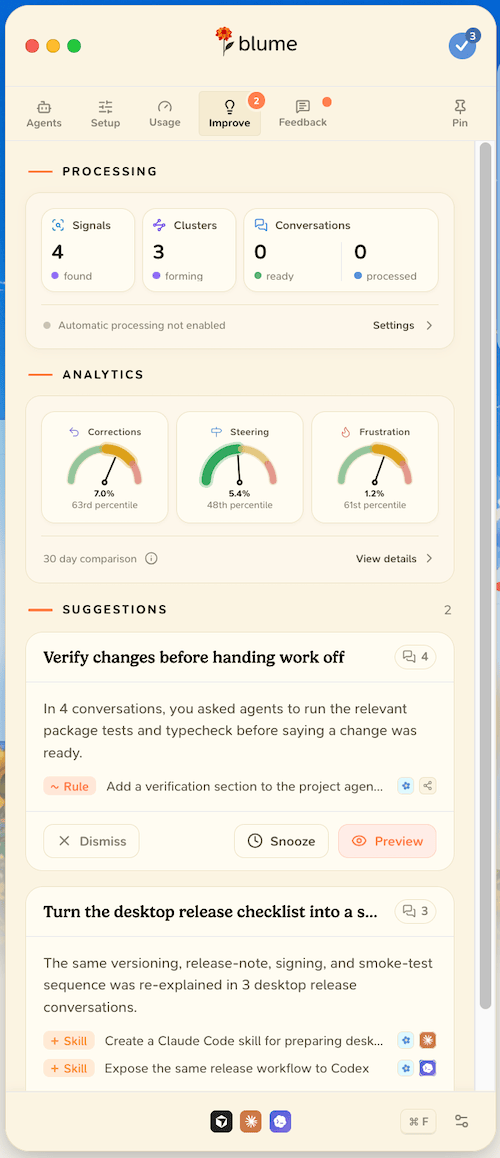
Using Cursor, Claude Code, Codex, omp or Pi (no I don’t recall reading about omp before either) can apparently get out of hand easily. Tools like this are for monitoring and guiding your coding agents.
Creao AI
“Agents that run your business” Creao is all about creating agents to do stuff for you. Their examples include responding to quote requests, generating ads, monitoring your inventory, writing briefs for many types of business documents or… almost anything you need done in your business.
Oreate AI
Looks like this one is a portal for using various models to make things for you. They call it and “all-in-one AI workspace” so you don’t have to keep moving back and forth between various AI sites. Their examples are slides and presentations, images, video (Seedance is listed), design, text generation and translation, plus a tutor and deep research are offered.
Osaurus
Run a Ollama, MLX, or LM Studio local model on your Mac. You can then hook up ChatGPT or Claude so this model can reach out to them if needed. Also check out
Nimbus
“The AI companion for the web” and this means it’s a Mac browser “with Claude Code UX”. That’s all they say about it on their home page. I assume you hook up your API key and get it to do wonderful things for you.
Meituan LongCat-Video-Avatar
Huggingface link. Upload a photo and an audio clip, the video produced comes out talking in sync can be minutes long. It supports actors, singers, podcasters, influencer styles. This is probably the type of thing they’re already using to create all those annoying YouTube ads. It’s free, MIT license.
Tasklet
“Agents that own the work” They call it a “teammate” rather than a chatbot. It still needs you to type what you want it to do for you though. The gamechanger here is that it “can build connections automatically to any HTTP API or MCP server, including the internal, private ones” that your company uses. So they have a free tier you can try out and then two more higher powered ones before you hit the famous “let’s talk” corporate level.
blader’s humanizer
A Claude Code skill that removes signs of AI-generated writing from text.
Social Media
Publer

A social media management platform that includes a link-in-bio, team approval features and analytics. It supports Facebook, Instagram, LinkedIn, Google Business, X, TikTok and YouTube.
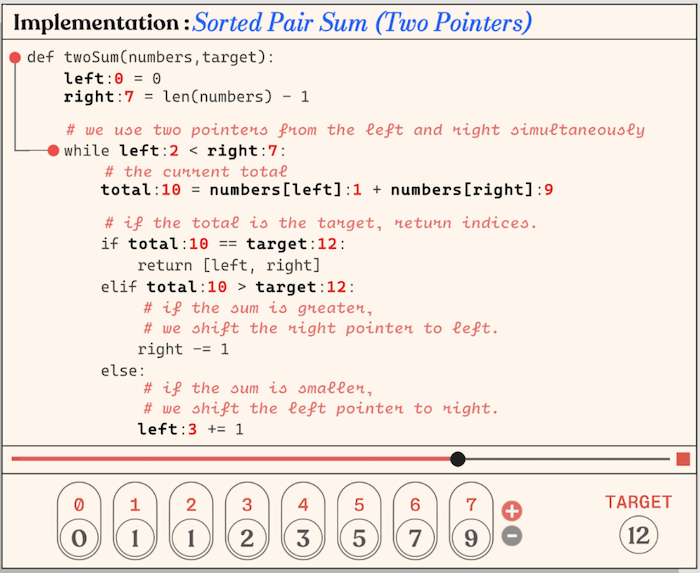
A contender for the Development section, this one is for learning all the basics about how to write code. There are visuals to show you the concepts and then one that steps through what the code is doing. Tests are included to check on your progress.
Audiostems Finish Starter Kit
Lots of people start making music by tinkering with loops but can’t seem to get the hang of arranging and completing a whole song and releasing it. If that’s you, this claims to be a “complete step-by-step system to creating, mixing & releasing your music” It covers using Live, Logic, Cubase, FL Studio and others. Example MIDI and WAV files are included.
File Sharing
Filesender
Want to DIY your file sharing? FileSender is an open source web application for sending files of “any” size, although surely there must be some limitations somewhere. Encryption is supported for your security.
Insync
You’ve got stuff in lots of online cloud storage providers, but how can you sync them to each other? This one does Google Drive, OneDrive and Dropbox syncing. I used to use one called StorageMadeEasy before they shut down personal accounts. There are a couple of others that do this, but I can’t recall their names right now.
Breeze
I know it’s technically a file transfer app, not file sharing, but there is no other category for these utilities so here it is. This one lets you move files from iPhone or Android to Macs or Windows PCs without having to use a sync service like iCloud or OneDrive. To help you decide if this is right for you, they offer a comparison table with AirDrop, LocalSend, Dropbox, and Quick Share.
Buzzheavier
A no-nonsense file sharing site with a free tier. That gives you an 8 day lifespan which can be extended by using the service more. Or, pay for permanent storage at €18/TB/Month.
Media Consumption
TBD - To be downloaded
This one allows you to download YouTube video and audio on your Mac. This is an ever-changing space because YouTube doesn't really want you to download content because then they can’t pump ads at you. Here is another in a long line of downloader utilities.
Elebean
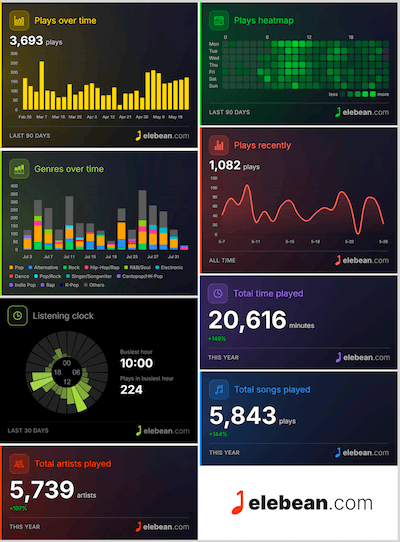
After listening to music, some people love to see reports of what artists, albums and songs they listened to the most. Spotify famously brought this data visualization to the masses when they started their year-end wrap up. Elebean takes that to another level with heaps more charts. It uses a browser so it will run on almost all devices. However at press time it only supports Apple Music, but they imply they are working on gathering data from other streaming services.
So that’s it for this issue. We’re now backlogged with so many items there are at least two issues worth of stuff to show you, and some days I find between 10-20 new ones. If only we had the time to check them all out, along with finishing all the stuff we make with the tools we already have. If it’s your first visit to this site, click on the tag cloud below to find the back issues with whatever category you fancy.